
The TRASSIR software is a state-of-the-art automated system, designed to organize video surveillance, intelligent processing and storage of video information, as well as providing means of access to video information to operational and dispatch personnel.
TRASSIR covers a wide range of tasks. It is a reliable basis for creating both centralized and decentralized video surveillance systems.
The software is implemented in a network distributed architecture: it can run both on a single server and as part of multi-machine complexes. The clients using video surveillance information work on separate workstations and can connect to the servers via local network or the Internet.
TRASSIR is the cutting-edge software with the following features and technologies:
TRASSIR technologies for reliable data storage
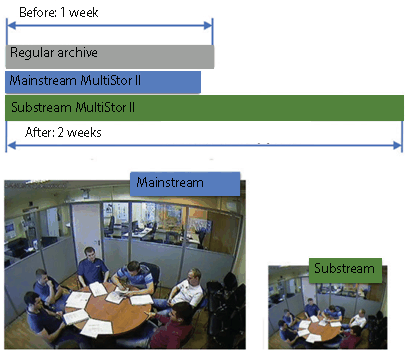
MultiStor II technology increases archive depth several times by minor reduction of the archive volume in the main stream while gaining significant increase of the archive depth in the additional stream. An additional feature of MultiStor II technology is parallel recording to multiple hard drives at the same time to avoid total data loss when any of them fails.
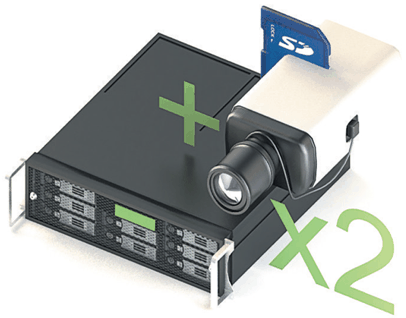
EdgeStorage technology effectively doubles the reliability of the operation with the video archive due to the use of two independent archives in a single system.
Modern IP devices (video recorders and IP cameras) support archive recording to the built-in hard drive or SD-card. TRASSIR can manage each archive separately and, in case of server failure or loss of communication, the data on the device will not be lost. After the network is restored, TRASSIR will provide access to the archive on IP devices.
Video data archive. TRASSIR supports an unlimited number of hard drives for recording, which allows you to create archives of tens of terabytes. It also supports hot-switching and connection of different types of digital media: CDs, USB drives and FireWire.
For each drive, there is a diagnostic system and statistics about disk space available for video archive recording; there are also a number of settings that let an administrator specify which drives are to be used and how, and how much hard disk space an archive can occupy.
Recording to the archive can be done continuously: by operator command, by schedule or by motion detector. The video archive can be securely encrypted, if necessary.
Video archive preview. TRASSIR allows you to conveniently work with the video archive of devices regardless of where the archive is physically stored. You can view video from the archive from a single device channel display window, either directly in front of the video surveillance server monitor or by connecting to a remote server via LAN, Internet or a chain of other servers.
Video archive export. TRASSIR lets you export video clips from the archive either directly in front of the video surveillance server monitor or by connecting to a remote server via LAN, Internet or a chain of other servers. This function may be necessary to save video clips with significant episodes to the device and to transmit video clips with significant episodes to third parties (for example, episodes with violations that may be necessary for investigation).
Lost channels. This feature makes working with the archive much easier, allowing you to view it on any PC without any additional actions and settings. You can record the archive from the video server to an external disk, then connect it to any PC where {TRASSIR} is installed, and work with the archive as on the video server. You can also view such an archive using the free client application, which does not require a USB key with a license to run.
For the channels to be created to view the archive on another computer, a term "lost" is used. Lost channels are the channels for which only the archive is available and there is no video register device (grabber).
All video surveillance system events are logged and stored in database, which can be either on the local or remote server. The storage time of events in the database is determined by the server settings.
Motion Archive Search. TRASSIR ActiveSearch built-in functionality of the AnyIP platform for interactive archive search based on metadata from a motion detector (or from the built-in detector on the device). It includes MultiSearch capabilities - search in one scene for fragments from different time points in the archive. The intelligent search of video fragments in the archive TRASSIR ActiveSearch feature, designed to work in conjunction with motion detectors and included in the default professional {TRASSIR} software package. It can work in conjunction with both the basic detector and SIMT object tracing detector. It also provides fast search in the archive by motion in the video camera scene area.

Search the archive by event. TRASSIR EventSearch is the archive event search software, based on the system event log. For visualization and convenience of searching for certain actions / signals / incidents, the software provides a special function {TRASSIR} EventSearch, which allows filtering events by keywords.
In addition to the default built-in labels, such as informing about the server health indicators state, user login, system shutdown, etc., you can create individual settings for displaying the information stored in the log, such as: appearance of an object in a prohibited area, identification of a car license plate number, conducting a monetary transaction, etc. In order to narrow down the search time frame, it is possible to select events in the specified days / hours / minutes interval. Also, by creating your own filters in the EventSearch, TRASSIR allows you to save them for future use.
TRASSIR Cloud is a free WEB-service that monitors the work of your servers around the clock. In addition, the TRASSIR Cloud allows you to manage your servers from your personal cabinet and display their status on map.
TRASSIR network capabilities

MultiStream is a multi-thread technology allowing to significantly reduce the requirements towards the video server or customer's remote computer. The technology consists in a simultaneous receipt of two video streams from the video camera with independent settings of resolution, degree of compression and frame rate.
The first stream of maximum resolution will be used to record to archive or display on screen while full screen viewing of the video from this camera. Second stream of low resolution and decreased frame frequency will be displayed on the screen (both customer and server) in multiscreen mode. Both streams can be set up independently and the system will switch between them imperceptibly, significantly saving server and network resources for the user.
Tier is a unique TRASSIR feature, that allows you to join servers in a tree-based network.
The server architecture allows you to build a distributed video surveillance system of any scale: an unrestricted number of network clients can connect to a single server, both through the local network and through the Internet. In addition, it is possible to combine an unrestricted number of servers into a single network, herewith servers can operate both independently and exchange data with each other; a remote server setup is also possible through the network. And the unrestricted network administration allows you to control any server through the customer's software or through WEB. When you access the system via web-browser, it will be sufficient to run web-server- and there would be no need to install any software to arrange operators' workplaces.
Ergonomic and management features

The open user interface allows you to customize your workspace using ready-made templates of screen separators and camera arrangement. Arrange any object at monitor screen the way you need: plans of the premises, video cameras arrangement, Access Monitoring and Control System and Operations Service event logs, AutoTRASSIR license plate recognition or ActivePOS cash control.
The multitasking operation mode performs all operations (monitoring, archive recording, archive view, settings, access via network, remote viewing of the video archive along with interaction with integrated safety systems) simultaneously in a single interface. Thus, the staff will be able to perform all necessary actions simultaneously without interruption of the other components of video surveillance system operation.
Administrator interface lets you set up all basic server/client parameters.
Operator interface is a simple and easy-to-use monitoring tool designed to view video from cameras.

Easy navigation accelerates user operation by times.
There is a built-in player for viewing the archive, which allows you to preview fragments in any order, scroll forward and backward, increase and decrease the viewing speed, and view frame by frame. You can also export segments of the archive to a video file and create screenshots.
MultiSearch significantly increases the search for events in the archive. Select the region and in a second you'll get in one scene segments from various time points of archive.
ActiveDome speeds up PTZ camera control by 20 times. This allows you to automatically monitor large areas and zoom in objects with a single click.
TRASSIR has built-in search tools, which allow you to find the required event and, if necessary, go directly to viewing the archive associated with this event. In addition, you can create filters for current events, which can reduce the amount of information displayed. Using filters, you can achieve the output of only those events that are worthy of the operator's attention.
A mechanism of video surveillance system flexible settings is implemented on server, using schedules, rules and scripts. Any equipment or video channel on the server can be both a source of an event or a performer of actions. The schedules, rules and scripts ensure management of video surveillance system response to any occurring events.
A multi-level rights distribution system is implemented in TRASSIR, allowing to prevent unauthorized access. An administrator can create user accounts with various combinations of access rights, for example: "current events review", "archive review", "archive export", "administration" (capability to change system settings), etc. up to possibility to control other user accounts.
API. TRASSIR has SDK that allows you to link TRASSIR with any other system in use and get information from it, and manage TRASSIR with commands.
TRASSIR integration

A wide range of supported devices. Different types of devices can operate in the same video surveillance system: Video capture cards with hardware/software compression and IP equipment. Meanwhile, the software works correctly with most modern hardware platforms, and the list of supported devices is constantly expanding.
The use of efficient H. 264 compression standard. This standard provides for unprecedented frame size under perfect quality. For example at 704 x 576 resolution and slight movement color frame size is 3 Kb and black-and-white half-frame - 1 Kb. H.264 provides for huge saving of disk space and allows long-term storage archives for lesser costs.

ActivePOS - integration with POS-systems. The widest possibilities of the cash control system are provided through event integration with leading trading systems. ActivePOS creates scenarios for detecting violations of any complexity, and a powerful reporting system with cash analytics will not leave scammers any chance.
Integration with Access Control System and Security and Fire Alarm allows you to get a complete list of events from ACS. It will provide possibility to adjust response rules, manage objects using maps, perform photo and video verification and view the status of all the objects.
AutoTRASSIR is an automatic license plate recognition system, that can be used to control the entry/exit of vehicles from the territory of enterprises, as well as, by the traffic police, at checkpoints and other control points. The server provides interaction with access control systems, video and audio control and executive devices (for example, barriers).
Built-in detectors and analytics
Sound detector triggers when the volume level is exceeded and starts video recording according to a preset scenario, allowing timely response to suspicious audio incidents.
Motion Detector allows you to detect any motion in the frame - a person, animal, vehicle, moving object or the beginning of rain. There is a hardware motion detector (motion detector of the camera itself), activity detector or HD activity detector (TRASSIR software motion detector). This feature allows you to receive notifications when there is motion in the frame, as well as save the archive capacity significantly by recording only when motion occurs.
Heat Maps. The system of "heat" video analysis is aimed at raising the security level. There are 2 operation modes : Dynamic and static. The first one superimposes a color scale of activity on video, as a result of which any moving object in the frame leaves a "trail" behind it, which disappears over time. The second accumulates "heat" indicators in separate parts of the image, where the activity was most intensively recorded.
Left object detector allows you to instantly identify abandoned and forgotten items, potentially threatening the security of the facility where video surveillance is installed.
Sabotage Detector allows you to detect various actions with the camera, such as changing the shooting direction (shift), changing the size of the shooting area (defocus), sudden increase or decrease in the lighting of the shooting area as sabotage, and using the Alarm Monitor script to customize reactions to these events.
Fire and smoke detector allows detecting smoke or fire faster than fire sensors (alarms), as well as providing fire protection in open spaces where fire sensors cannot be installed.
Alarm notifications
TRASSIR allows you to receive notifications when an alarm event occurs in the form of incidents in the client or on the server, as push notification in the mobile application. To generate notifications, you need to add and run a script on the server.
