
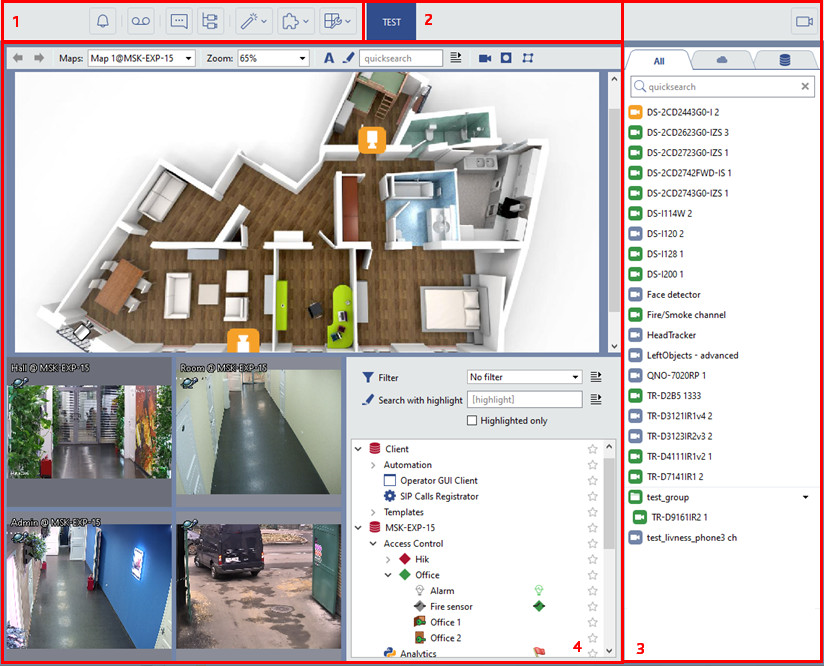
The main interface elements are:
- Menu - A set of buttons for controlling the video monitor interface:
Table 23.

switching the video monitor to the TRASSIR Cloud incident management mode and back.
Tip
This mode is available only on the client.

Switches the video monitor back and forth from the Archive Mode mode.

Shows/hides the event log.

Shows/hides the object tree.

Extension Panel. Opens the map, screenshot manager, the ActivePOS expert mode or executes a user function (activates a rule or script).

switching the video monitor to the connected modules operation mode (i.e. Access Control reports).

Template editor.

Shows/hides the channel list.
- Template menu – The set of saved templates.
- Channel list – The area which is used to monitor the state of cameras (and groups of cameras) and, if required, to display video from a particular camera on the entire screen.
- Main output area – The area which is used for video surveillance directly. It is organized using the template editor.
