
The correct selection of a video surveillance camera and its proper installation and configuration are among the key requirements for the correct operation of the AutoTRASSIR/AutoPass plugin. We recommend that you read the Administrator's Guide very carefully.
Camera requirements:
- AutoTRASSIR (LPR5) plugin supports video from any surveillance camera.
- HSC AutoPass supports only TRASSIR cameras with in-built LPR plugin.
- We recommend to use AutoTRASSIR (LPR1) or AutoTRASSIR (LPR3) plugin on grayscale videos featuring greater resolution and sensitivity (in comparison with color videos, the processed color videos are converted to grayscale during the detection).
- An analogue camera used with the AutoTRASSIR plugin must feature 500 TVL (television lines) or greater resolution.
Image quality requirements:
-
The primary problem affecting image quality during license plate recognition is motion blur. To avoid motion blur, the shutter speed (the time each frame is exposed) must be very small.
The maximum shutter speed depends on the vehicle speed and the camera's installation angle (see the figure). The camera installation angle is the angle between the optical axis of the camera and the direction of vehicle motion.

Important
The shutter speed must be fixed or, if the camera supports it, a maximum shutter speed must be set.
To work with the AutoTRASSIR plugin, the camera must support the manual shutter function!
For example, given a camera installation angle of 20° and a speed of 80 km/h, the shutter speed must be set at 1/1000 of a second (see the figure).
Camera angle requirements:
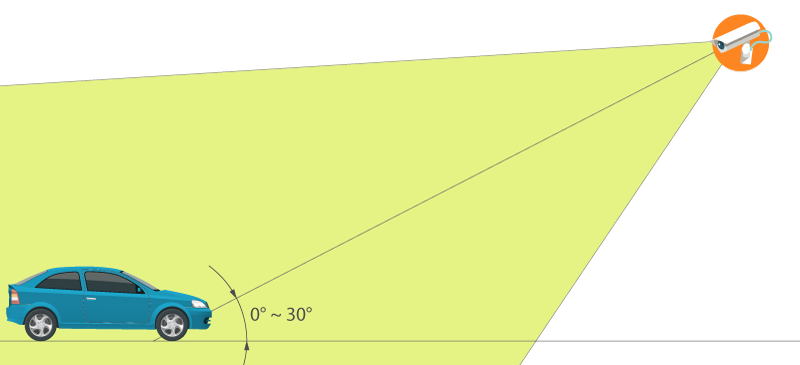

- AutoTRASSIR (LPR5) and HSC AutoPass plugins support camera angle (up to 30°) to the vehicle movement direction. The greater the angle, the lower the recognition quality.
- The camera used with AutoTRASSIR (LPR1) and AutoTRASSIR (LPR3) plugins must be installed in a way that the license plate surface appears at the right angle to the visual axis of the camera to exclude recognition errors.
Tip
Given large camera installation angles, the time of vehicle passes through the camera's field of view must also be considered. For good recognition results, the camera should capture at least 10 frames of the license plate number being recognized.
License plate in frame position requirements:
- AutoTRASSIR (LPR5) and HSC AutoPass allow for the horizontal deflection of up to 5° of the license plate without the recognition quality degradation. The 5°-10° deflection of the license plate can cause errors in the recognition of certain characters.
- AutoTRASSIR (LPR1) and AutoTRASSIR (LPR3) plugins require the license plate to be positioned horizontally in the frame.
Tip
If swing barriers are used to control entrances/exits, we recommend installing the camera in such a way that the swing barrier does not reach the bottom of the screen. Otherwise, the swing barrier may cause false positives.
Lighting conditions requirements:
-
Verify that there is sufficient brightness during nighttime conditions. To do this, record a small video. License plate numbers should be easily recognized during playback. If the license plates on the image are too noisy or dark, the brightness must be increased or the lens must be replaced with a higher-aperture lens. Also be sure that the lens diaphragm is fully open. We do not recommend installing the camera at a low height because at night the camera will be overexposed by the headlights of passing vehicles.
Other camera settings and image requirements:
- The superposition of any information onto the image (date, camera name, etc.) must be disabled.
- Autofocus must be disabled.
-
The focal distance must ensure that the license plate of the vehicle is about 120 to 140 pixels horizontally on the processed video.

