
Tip
This section contains the information on the archive setup on client.
We also advise you to get acquainted with the following sections: Archive and Selecting the number of disks for an archive.
In the Settings -> Archive tab, you can determine which drives and what mode will be used for the archive.
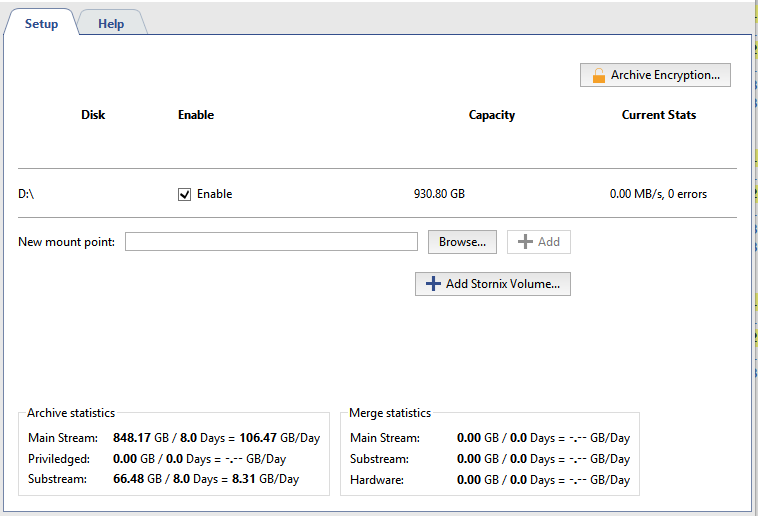
You can set individual settings for each drive:
- Enable flag - authorization or prohibition to use the drive in the system.
- The capacity of the drive (partition) is given in Capacity column.
- Current Stats column displays current archive recording speed and the number of errors. In some cases an access error can occur while trying to access the drive for recording/reading. Such cases may include for example lost communication with network drive, in case the drive fails to cope with excessive data or it has hardware issues.
Tip
It is recommended to use "HDD Kicker" script for local drives. This script can disable problematic drive to prevent data loss.
Warning
In case the disk space is less than 10 GB, it will be marked with "Not appropriate" line in the list. In case it contains the archive files, check Enable to view them.
New mount point - adds any folder for subsequent use of its disk space by the archive. Adding a new mount point may be useful if, for example, you need to view the archive files written to another server that lacks a network connection. You can indicate the folder using the Browse button, or enter the path manually and press Add. No additional steps with the archive are required. Archive data added using a new mount point will be available as lost channels.
Important
Do not merge archive disks of different servers or disks of the same server connected at different time. This may result in the entire archive incorrect operation.

You can encrypt stored video data in order to prevent unauthorized access to the archive. Press Archive encryption... to set up.
General archive stats is displayed at the bottom of the window. You can see the depth in days and total scope of data for mainstream and substream individually as well as privileged channels stats. Here you can also see how much space is required to store one day of the archive records.
Important
The archive of 4.0 version supports gradual upgrade of the archive from 3.1 version. The entire archive from the older versions will be available as lost channels and will be erased as the new archive is written.
