
Important
The number of connected Paradox devices is determined by the number of LICENSE_PARADOX licenses on the server.
Available licenses are listed in the server settings on the tab License.
Tip
TRASSIR supports working with the following ACS control panels:
- SP4000
- SP5500
- SP6000
- SP7000
- MG5000
- MG5050
- EVO192
- EVOHD
In order to connect the server to the Paradox system, you need Paradox-Trassir-client, which you can download from our website. Next, execute:
-
Unzip the application archive on a PC used for launching the application.
Paradox-Trassir-client can run on any PC with OS Windows installed, located in the same local network with "Paradox" system servers and control panels.
-
In the configuration file
connection.inispecify client connection parameters to Paradox system control panel and server.#Paradox-Trassir client utility ini file #Connection settings to Paradox server: #Panel 1 host 192.168.1.69 port 10000 panel_id 1 login 1234 password paradox #Panel 2 host 192.168.1.68 port 10000 panel_id 2 login 1234 password paradox #Local settings: local_port 10050 #local port should be specified at Trassir when connects to Paradox
whereas:
- host - control panel IP-address
- port - connection port.
- panel_id is the number of the panel to be used by the server for its identification.
- login and password - code of user and password which will be used to connect the Client to control panel.
- local_port is the port via which the server will connect to "Paradox Trassir Client". The same value shall be specified in system connection settings.
-
Install Paradox Trassir Client service on your PC. To do this, press paradox-trassir-client-vc120.exe install.
Important
The user should have admin rights.
-
For automatic start of the service, change Run type in its settings.
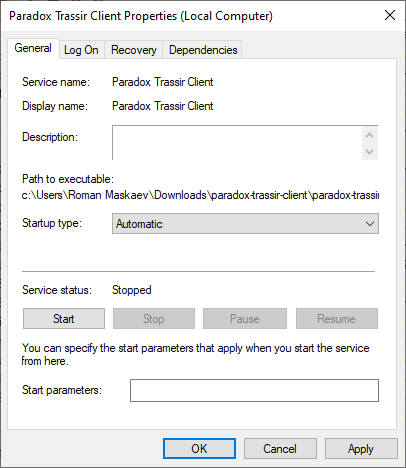
After that, you can proceed to to adjust server connections for Paradox system client.
Tip
You can connect any number of servers to a single PC with "Paradox Trassir Client" installed.
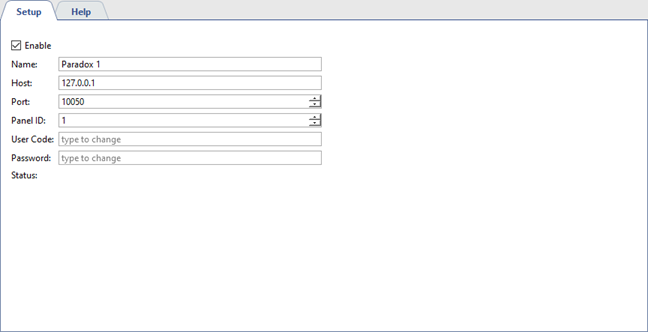
Specify the following parameters in the "Paradox Trassir Client" connection settings:
- Address - IP-address or DNS-name of PC where "Paradox Trassir Client" has been started.
- Port - port of connection to "Paradox Trassir Client" specified in configuration file
connection.ini. - Panel ID is an identification number of the panel to which the server is connected as specified in the configuration file
connection.ini. - User code - identification code of user set on connected panel and specified in configuration file
connection.ini. - Password - password corresponding to identification code of user.
