
Unlike other retail systems, R-Keeper uses a fixed port to receive data packets from several terminal devices or cash registers; The terminal number is written in the transaction packet.
The server handles this peculiarity with an automation script that receives R-Keeper transactions, analyzes their contents, and redirects them to the appropriate ActivePOS terminal.
Configuration of the server for the R-Keeper protocol consists of three steps:
-
Terminal configuration
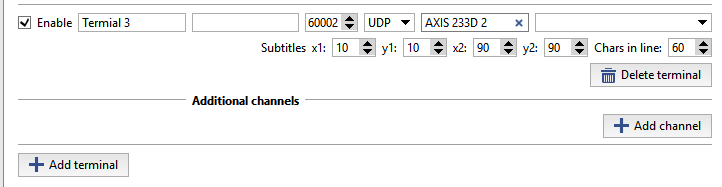
R-Keeper POS-terminals must be configured as follows:
- IP address - blank
- Port 60,000 more than the terminal number (for example, for terminal 13, the port is 60013; for terminal 37, the port is 60037)
- TCP/UDP - UDP
-
Redirection script
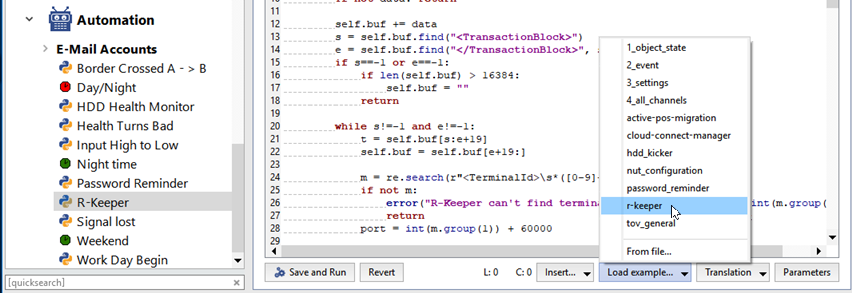
You can find the redirection script in the examples:
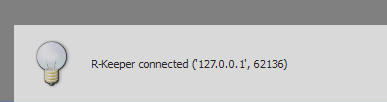
When an R-Keeper terminal is connected to the script a pop-up message will appear:
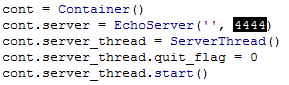
The serve awaits for the data on port 4444, by default; you can change this port number by editing the following lines, if necessary:
-
Editing the configuration file
For correct processing of the R-Keeper transactions, you should edit pos-rkeeper.ini, which is located in the server folder.
The file is written in the INI format and has the following structure:
- [CashMachines]
- Name of a group of terminals (for example, [Group1])
- terminal_ids="1,2,5,7"
- A list of the terminals in the group
The line 'terminal_ids="*"' signifies the numbers of all terminals that have not been explicitly indicated in the configuration file
- date_format="dd.MM.yyyy"
- The date format
- time_format="h:mm:ss"
- The time format
-
FN_RECEIPT_BEGIN_MIN=100
FN_RECEIPT_BEGIN_MAX=100
- The range of FunctionNumber for the "New receipt" event
-
FN_RECEIPT_END_MIN=10
FN_RECEIPT_END_MIN=10
- The range of FunctionNumber for the "Receipt closed"
-
FN_POSITION_ADD_MIN=101
FN_POSITION_ADD_MAX=105
- The range of FunctionNumber for the "Position added" event
-
FN_PRINT_MIN=200
FN_PRINT_MAX=999
- The range of FunctionNumber for the "Comments" event
-
FN_RECEIPT_DISCOUNT_MIN=4
FN_RECEIPT_DISCOUNT_MAX=4
- The range of FunctionNumber for the "Discount applied to receipt" event
-
FN_CANCEL_BEGIN_MIN=0
FN_CANCEL_BEGIN_MAX=0
- The range of FunctionNumber for the "Canceled receipt opened" event
-
FN_CANCEL_POSITION_MIN=6
FN_CANCEL_POSITION_MAX=6
- The range of FunctionNumber for the "Position canceled" event
-
FN_CANCEL_END_MIN=0
FN_CANCEL_END_MAX=0
- The range of FunctionNumber for the "Canceled receipt closed" event
Tip
You can find the configuration example in pos-rkeeper.sample.ini in the server folder
To determine the range values, you must either analyze protocol dumps or refer to the documentation and settings of the devices being used.
Warning
All of the settings must be specified for each group of terminals. If you do not know the range, fill it with zeros.
Tip
The ranges of different events must not overlap for correct operation.
A configuration file string beginning with ";" is a comment and is not analyzed.
There is no need to restart the server to check the modified settings, just turn off and on the adjustable ActivePOS terminal.
- [CashMachines]
