
Go to the Server settings-> Plugins -> Neuro Detector and select the neuro detector version that will be used for detection of objects.
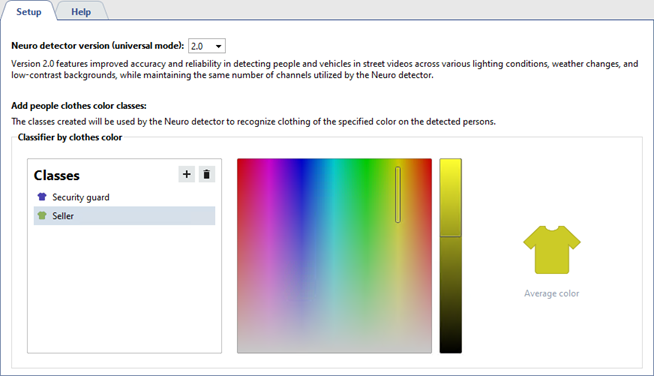
The Neuro detector version 2.0 provides enhanced accuracy and reliability in recognizing people and vehicles in street video under various lighting conditions, weather changes and low-contrast backgrounds, while maintaining the maximum number of working channels.
To create a class press  and enter the class name.
Next:
- Select the color that is prevailing in the clothing of an employee of this class on the color scale. For example, select the blue color for a security guard, wearing a dark blue uniform.
- Select the color range on the scale that the detector will use to detect people under different lighting conditions.
Important
To enhance the plugin operation quality, we advise to use bright and deep colors in the outfit. It will reduce the number of false activations and will allow the detector to detect the required person from the total quantity of the detected people.
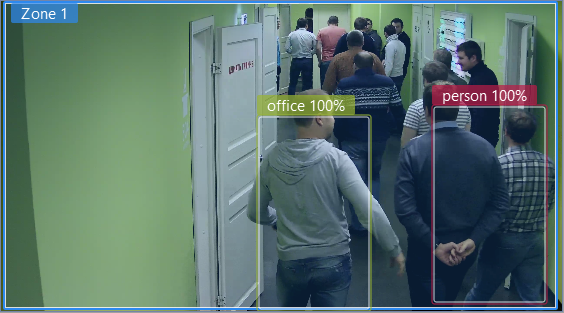
The Neuro Detector will use the created classes to detect the color of clothing of the detected people.
It can be used in the following situations:
- to detect and count the number of store employees in the given area;
- to subtract store employees from the whole number of detected people;
- etc.
Tip
Read more about classes for object detection in Neuro Detector settings.
Updating Neuro detector to version 2.0 on connected servers
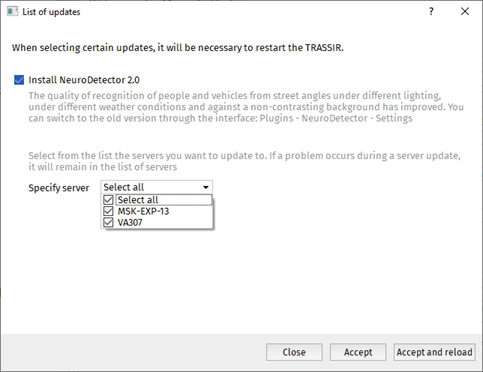
To improve the system performance and detection, it is necessary to upgrade the Neuro detector to version 2.0 on all connected servers.
When starting the client/server to which the servers are connected, the List of updates will appear with the list of all servers that require updates. In order to upgrade, check the Install NeuroDetector 2.0 box, specify the servers to upgrade, press Accept and reload and wait for download yo complete.
Tip
The servers experiencing problems with the upgrade, will be marked as inactive.
Check the client's connection to the neuro detector servers and make sure the client user has the appropriate access rights.
