
Important
To connect the server to TRASSIR CMS, a LICENSE_CLOUD license is required on the server.
Available licenses are listed in the server settings on the tab License.
Important
TRASSIR CMS supports connecting to TRASSIR servers with software version 4.0 and higher.
Before connecting to the server, do the following:
-
Go to the Automatization section and create a new script with the following content:
settings("system_wide_options")["cloud_address_global"] = "cloud.trassircms.ru"where cloud.trassircms.ru is your TRASSIR CMS address.
- Press Save, run to run the script.
- Reboot the server.
In the cloud:
-
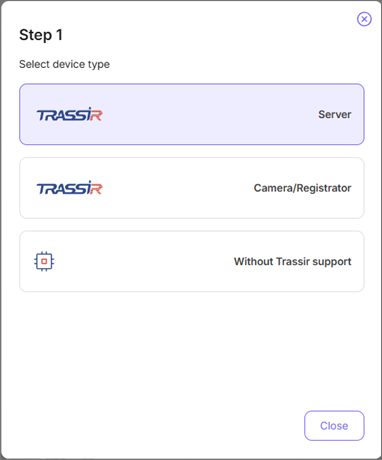
Step 1.
Click Add device button on the Monitoring Center page.
-
Step 2.
Click TRASSIR (server) button.
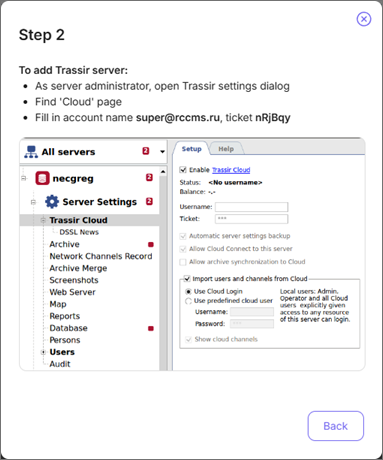
Remember the Account name and Ticket.
On the server:
-
Step 3.
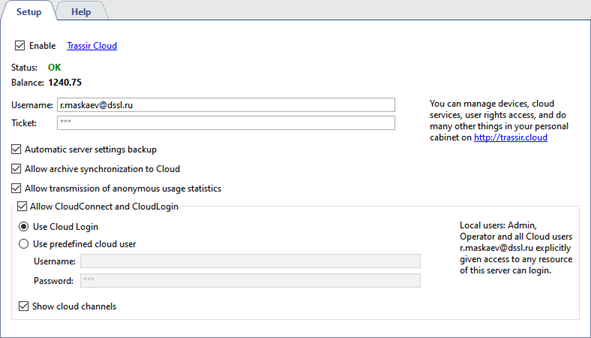
Open the Cloud tab in the connected server settings and enter Username and Ticket into corresponding fields.
Tip
Read more about the server operation with the Cloud in the Administrator's Guide.
