
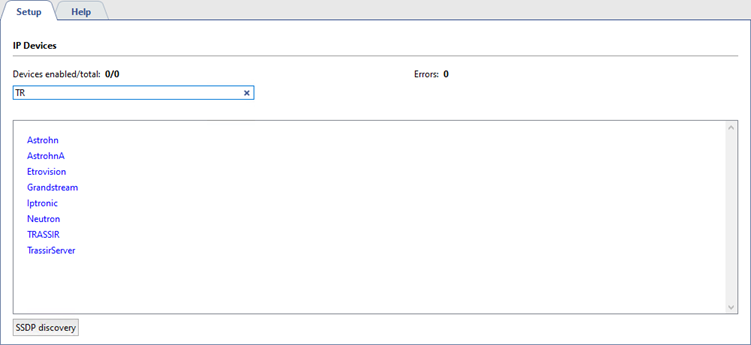
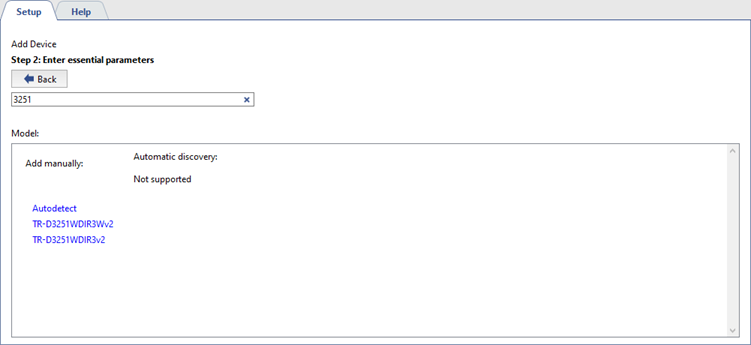
Select a model from the Add manually list. If needed, you can use quick search to shorten the list of camera manufacturers and models, or click Search and select the desired device from the search results.
Tip
Automatic search allows you to discover available IP devices on your local network and add them to the connection list without manually entering parameters.
The search is performed using the UPnP service and is not supported by all manufacturers. To work with Hikvision NVRs and cameras, ensure UPnP is enabled in the device settings via its web interface. If the device is not detected after enabling the service, you can add it manually using the SADP utility, which is available for download from our website.
Tip
If the device you want to add is not in the list of models, or if you encounter problems adding it by model, you can use the Autodetect function to automatically determine the model, functions, and characteristics of the device using the general protocol of the selected manufacturer.
Please note that the Autodetect feature is not available for all manufacturers.
Tip
For Hikvision, Dahua and AXIS IP cameras, you can use the Unified device as a universal option instead of choosing a specific camera model.
Select it, if the device only needs basic functions: video streaming, display and basic sound.
The Unified device should be considered as a backup solution that helps connect equipment when other methods fail.
Enter the connection information in the window that opens.
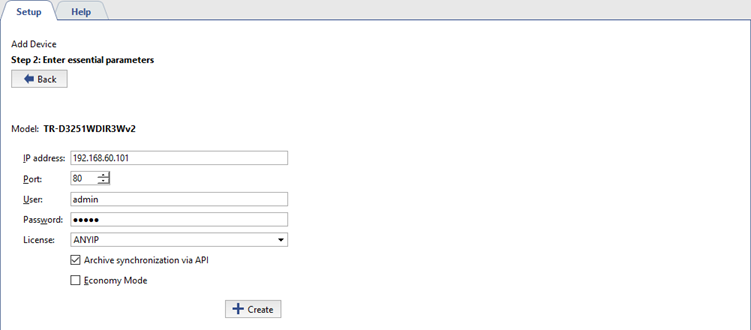
- IP address - The address doesn't need to be specified if the device was found automatically.
- Port - The number of the network port for connecting to the device (may be different from the web interface's port).
- Username and password - Note that the username and password entered must be for a user whose credentials are stored on the device itself.
- The License under which this device will connect.
- Archive synchronization via API. Set the flag to use the method to synchronize the camera archive to the server with increased speed.
- Economy mode - Set this checkbox if the transmission channel is unstable, costly, or if you do not intend for video from this device to be continually transmitted (e.g. the video will only be provided on-demand).
Important
Most of TRASSIR cameras feature Archive synchronization via API.
In order to activate this feature on previously connected cameras, you need to reconfigure their connection on server.
Click Create. The device settings window will open.
