
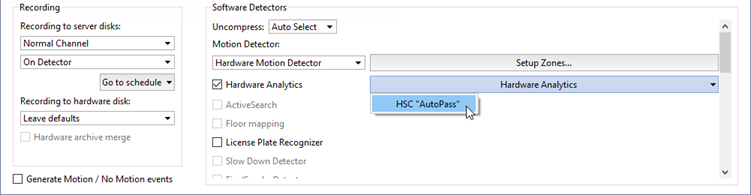
To activate the plugin, go to the Channel settings and in the Software detectors area select Hardware Analytics. Press Hardware Analytics and choose HSC AutoPass.
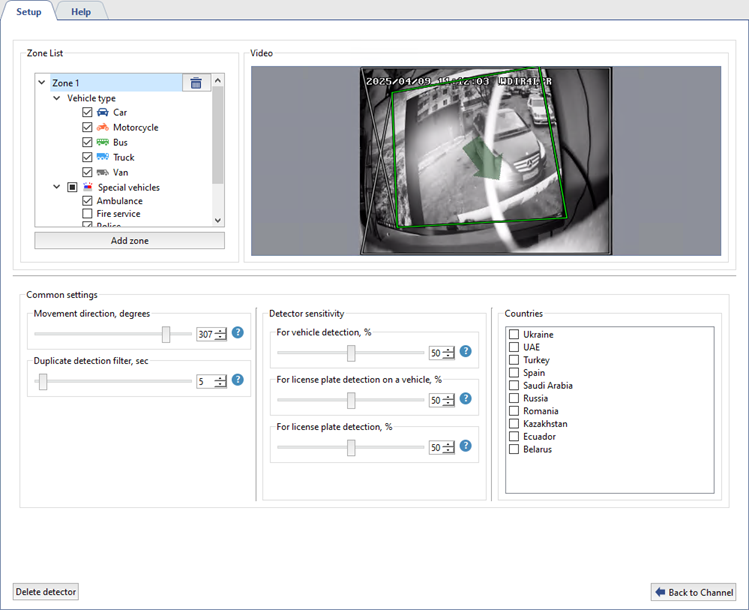
In the window that opens, configure the plugin operation settings:
-
In the Zone List settings group, create up to 5 zones for vehicle detection. To do that, press Add zone and select an area on the video frame. In the zone settings, select Vehicle types (Car, Motorcycle, Bus, Truck, Van) and Special vehicles (Ambulance, Fire Service, Police, National Guard, Emergency Service, Investigative Committee) to trigger the detector in the zone.
-
In the Movement direction, degrees parameter, set the traffic flow direction to be defined as the direct movement by the detector. The direction is indicated by the green arrow on video and the slider shows the value in degrees.
The Duplicate detection filter, sec parameter allows you to eliminate repeated detections of the same license number if it has been previously recognized. Repeated detections may occur when the recognized license plate number disappears and then reappears in the frame, e.g., when it is hidden by another car. Select the time interval during which the recognized license plate number will not be detected repeatedly by the plugin.
-
Select a value for the Detector sensitivity parameter:
For vehicle detection, % is the detector confidence level for the presence of a vehicle in the video.
For license plate detection on a vehicle, % is the detector confidence level for the presence of a license plate on the detected vehicle.
For license plate detection, % is the detector confidence level that the detected license plate is really a vehicle license plate.
-
In the Countries list select country templates for the license plates to be recognized.
Tip
When the detector is configured properly, the recognized license plates and types of vehicles are shown in the operator interface in the AutoTRASSIR/AutoPass Log.
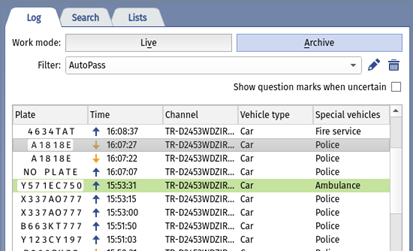
For a detailed view of the recognized license plates, see License plate recognition and Filtering current license plates sections of the Operator's Guide.
