
The plugin is designed for automatic detection and recognition of faces in the camera image and can be used in video surveillance systems to control people entering the territory, analysis of large crowds, etc.
Tip
There are two versions of the plugin: Face Recognizer and Face Recognizer 2.0 built into TRASSIR. Both versions can work with the face database, located both locally (on the server with the plugin) and remotely (on any server that is connected to the server with the plugin).
Read more about the face database location in Face recognizer basic settings.
Important
Features of the plugin remote mode operation settings:
-
The server with cameras that recognize faces must be connected to the server with TRASSIR OS, which will be used as Analytics Server.
The TRASSIR OS server of NeuroStation version can be used as analytics server.
Read more about server connection in Connecting to a new server.
-
Check the Enable remote analytics flag in the user's settings, which will be connected to the analytics server.
-
The number of channels that can be used by the plugin are determined by the by the license on the analytics server.
Plugin options
-
Human face detection
The plugin searches for a face in the camera video and highlights it. It is possible to detect a face on a video taken from any angle, including faces in profile.
-
Face tracking
The plugin supports tracking and single face monitoring (Face Recognizer) or multiple faces in a stream (Face Recognizer 2.0).
-
Face identification and quality assessment
Comparing the found face with the one saved in face database and determining the degree of matching.
-
Identifying gender and age by face
-
Recognizing specific attributes of a person's appearance
In addition to gender and age, the plugin can recognize and search by individual appearance attributes, such as hair color, the presence of glasses or headgear, etc.
-
Ability to recognize the usage of photo in frame
Identification of the use of a photo instead of a live face in the frame by comparing various characteristics of a person's face with a static image.
Tip
The combined use of the Face Recognizer and TRASSIR ACS plugins allows you to:
- use a person's face as an identifier for authentication (see Card reader settings and Connecting and configuring a software controller).
Recommendations on choosing and setting up a camera
- The sensor size should be at least 1/3", the lens aperture should not be less than F1.4. In case there are high-contrast areas with various degrees of light in the shooting area, it is recommended to use cameras with a hardware WDR.
- To work with the plugin, it is recommended to use a camera with a varifocal lens that will allow you to zoom the shooting area in or out without changing the camera position. It is not recommended to use fish-eye lens cameras.
- The camera should be set to the minimal shutter speed and minimal GOP.
- It is recommended to disable noise reduction and other digital image transformations.
- The image should be clear and without any distortions. The faces in the image should be sufficiently contrasted, illuminated and clearly distinguishable to the naked eye.
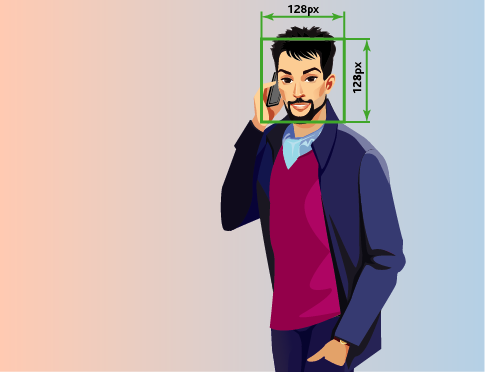
- The distance between the pupils in the image must be at least 60px. Use a camera with any resolution, but so that the size of the face in the frame is greater than 128px.
Recommendations on choosing angle and lighting
- The survey area where faces are detected must be well lit. The presence of shadows on the face or excessive light will significantly reduce the probability of recognition of the person.
- The installation of multiple cameras is recommended for broad areas.
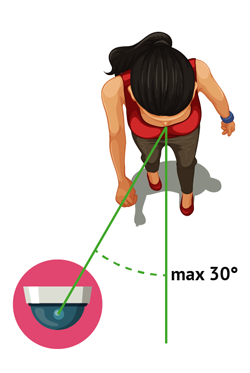
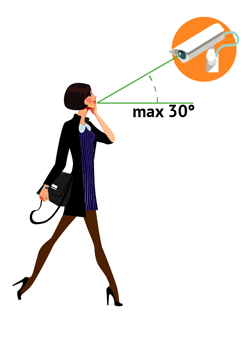
- The shooting direction should be in such a way that people's faces look directly into the camera lens. It is allowed to rotate the camera horizontally or vertically, but not more than 30 degrees. The best recognition quality is achieved when the faces are tilted by no more than 15 degrees.
See also
