
The list of incidents can be very long. Therefore, it is more convenient to limit their number on the screen as much as possible. For example, leave only messages about motion from one particular camera. Use corresponding filters to do that.
A set of filters allows flexible management of the list of incidents and prompt detection of situations that need to be viewed by the surveillance system operator.
You can use two types of filters with the incidents: temporary and permanent.
-
Temporary filter is used to filter incidents in the short term following the set criteria. It is configured exactly as the permanent filter but its settings are not saved after the end of the session or the interface update.
-
Permanent filter saves its settings and allows to switch quickly between preset filter parameters. It is convenient for regular review of incidents under the definite parameters.
To create a filter in the event log:
-
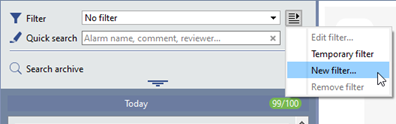
In the Filter drop-down list, select New filter… or Temporary filter.
-
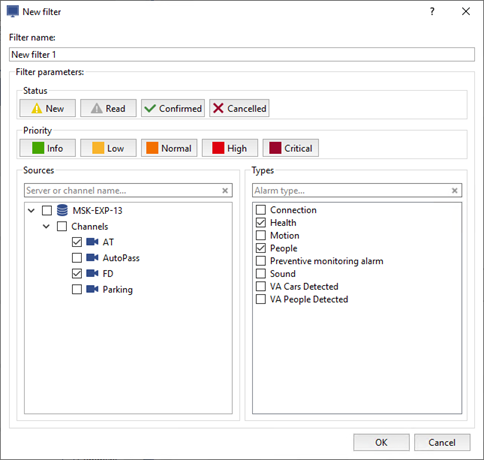
In the New filter window that opens:
- On the left side, select the sources to show incidents from.
- On the right side, select the incidents to display.
-
Select Status and Priority of the displayed incidents.
-
To create a permanent filter, enter its name and press OK.
A temporary filter doesn't require a name.
