
Important
The number of connected digital displays is determined by the number of LICENSE_PACS_ELTABLO licenses purchased in addition to the base TRASSIR ACS license on the server.
Available licenses are listed in the server settings on the tab License.
At the moment, the software supports Parkovka №1. Model TP-210x3e display by Eltablo.
The parking display presents real-time information about the parking availability, including the maximum and current number of free places.
To connect a display, go to Plugins -> Access Control -> Devices and press Add. In the menu that opens, select Eltablo in the Family field and enter the connection parameters.
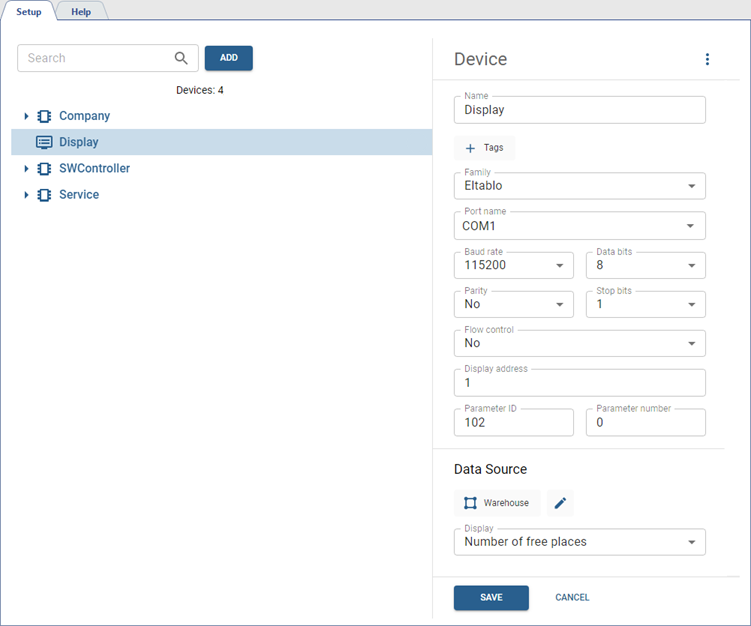
Configure the following:
- Name displayed in the added devices tree.
- Add Tags to make it easier to find the display among all added devices (see Tags).
- RS-232 connection parameters for the display: Port name, Speed, Data bits, Parity, Stop bits and Flow control.
- The information display parameters: Display address, Parameter ID and Parameter number.
The display will show data selected in the Display field coming from the area selected as the Data Source.
Tip
For the areas selected as the data source, enable Count objects (see Areas).
