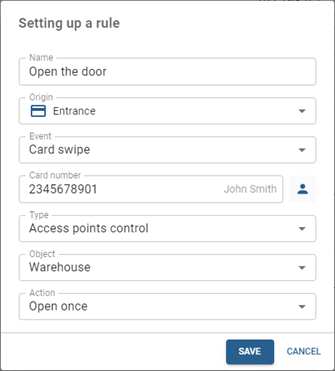
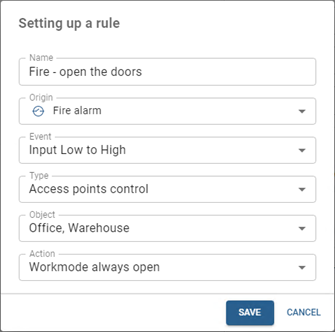
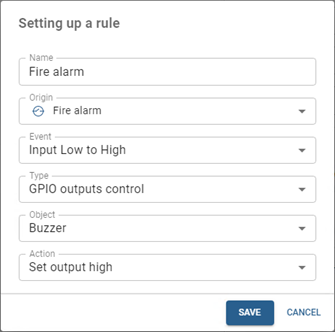
To create autonomous rules, open the server settings section Plugins -> PACS -> Devices, select the controller, and open Autonomous Rules in its settings.
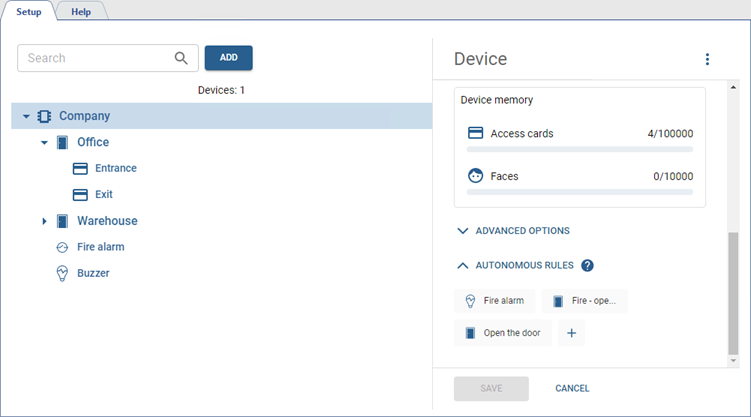
To create a rule, click the button  .
.
Next:
-
Enter the Name of the rule.
-
Select Origin and Event for the rule to be executed.
The list of available events depends on the selected origin:
- Events for Controller: Controller tampering alarm, Network - disconnected, Network - recovered, Battery - low voltage, Battery - voltage recovered, AC power - off, AC power - recovered.
- Events for Access point: Opened, Closed, Button press, Remote open, Break-in, Open timeout, Unlocked, Locked, Workmode always open - started, Workmode always open - stop, Workmode always close - started, Workmode always close - stop, Multifactor authentication - success, Multifactor authentication - need remote open, Multifactor authentication - failed, Multifactor authentication - timeout.
- Events for Card reader: Access granted, Access denied, Card reader tamper alarm, Card swipe.
- Events for GPIO inputs: Input Low to High, Input High to Low.
Tip
If the Card reader is selected as the source and Card reading as the event, an additional Card number field appears in the rule. The rule will be executed only when the specified card number is read. To enter the number, click
 and select or manually enter the person’s card number.
Note that the rule uses the card ID, not the person associated with it. This means the rule remains active even if the person is deleted, as the card number stays in the rule. You can reassign the card to another person or delete the rule if necessary.
-
Select the Type, and depending on it, the Object and Action:
- for the Access points control type, the objects will be access points of the controller, and the action will be the command sent to them;
- for the GPIO outputs control type, the objects will be the GPIO outputs of the controller, and the action will be the command to close or open the output.
Tip
All created rules are stored in the controller memory and will function in the event of a connection loss between the controller and the TRASSIR ACS server.
Examples of rules: