Incidents in TRASSIR CMS are the special markers by which the alarm events, occurring o the connected devices are marked. The incidents' mechanism allows using TRASSIR CMS as a system that captures various events that you can come across in the cloud device operation, such as connection loss, motion in the frame, sound near the camera, etc., and notifies video surveillance users.
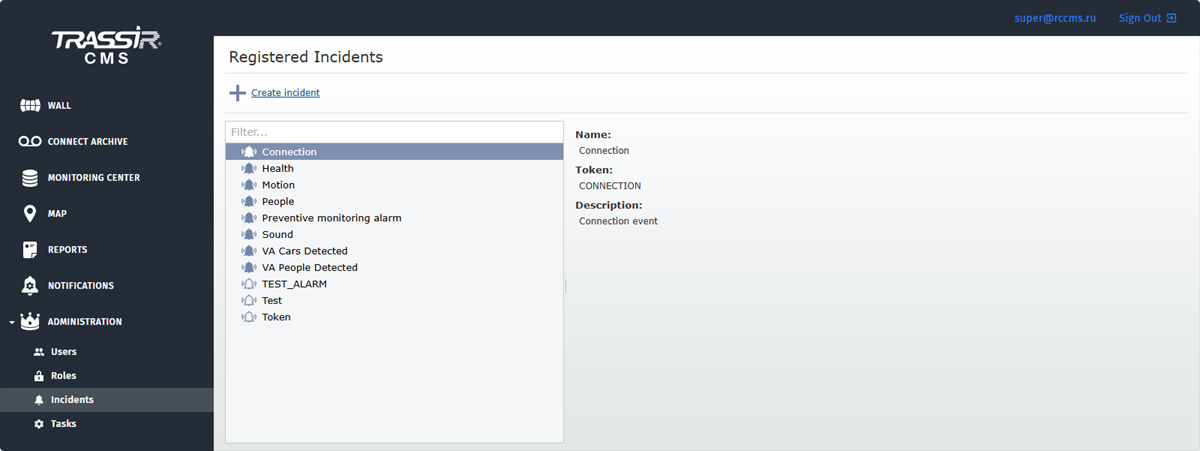
TRASSIR CMS has standard built-in incidents, by which the following alarm events are marked:
- Connection - loss/recovery of the connection to the device;
- Health - alteration of the device health indicators;
- Motion - detection of motion on video;
- People - people detection on video by hardware analytics
- Preventing monitoring alarm - changes in Preventive monitoring parameter values
- Sound - detection of sound near the device.
- VA Cars Detected - vehicles detection on video by cloud analytics.
- VA People Detected - people detection on video by cloud analytics.
The main function of TRASSIR CMS incidents mechanism is sending messages about alarm events occurring on the connected devices. Moreover, you can choose one or several ways of getting this information:
- by e-mail (read more in Device status notification settings);
- as PUSH notifications in the TRASSIR operator interface.
Tip
Rights to receive notifications on incidents in TRASSIR CMS are defined by roles. For details on user role settings, see Roles.
Important
What you need to know to create an incident:
-
Only TRASSIR servers can be a source of incidents.
-
A special script should be installed and configured on TRASSIR server. It will mark the required alarm events with a special marker.
-
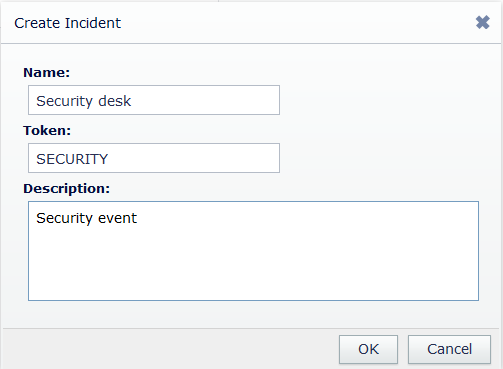
You should create an incident in TRASSIR CMS. Enter the same special marker into the Token field and the name of the incident, which will be displayed in the messages into the Name field.