
Motion detectors may either be hardware-based or software-based. Hardware-based detectors do not require any server resources, i.e. video processing is performed on the device itself. Software-based detectors use server resources. Moreover, some devices do not have hardware-based detector or a hardware-based detector may not be supported for a given device.
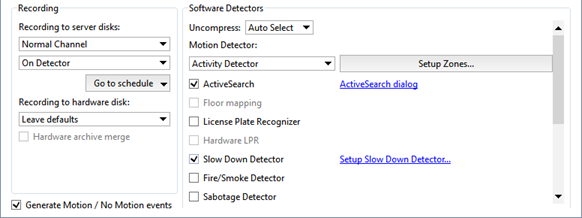
The Decompress parameter selects which of the streams – the primary stream or the substream – will be used by the software-based motion detector. In most cases, the quality of the auxiliary stream's video is good enough for the software-based motion detector. Selecting this stream conserves a substantial amount of server's processing power.
Tip
We recommend selecting Auto Select in the Uncompress setting. In this case, depending on the motion detector and video analytics systems used, the optimal unpacking stream will be selected.
The Motion detector settings group lets you select which detector will be used.
- Disable - turns off motion detection on this channel.
- Hardware Motion Detector - The device's integrated hardware-based detector will be used for motion detection.
- Activity Detector - the free software-based detector will be used for motion detection. This detector is suitable for most scenes.
- Activity Detector HD - the free software-based detector designed for detecting the motion of small objects in large spaces will be used for motion detection.
Tip
After the type of detector is selected, it must be configured. You can read more about the settings for each type of detector in the corresponding section.
You can enable use of one or more software video analytics plugins on the channel:
- ActiveSearch
- License Plate Recognition
- Slow Down detector
- Fire/Smoke Detector
- Sabotage Detector
- Face recognizer
- Empty Shelf Detector
- Neural Empty Shelf Detector
- Queue Detector
- Head Tracker
- Workplace Detector
- Neuro Detector and Floor mapping used to expand the functionality of the detector
- ArUco Detector
- Bags counter
- Pose detector
- Camera image quality indicator CiQi
If a camera with one or more hardware video analytics plugins is connected to your server, you have the access to:
- Face detector
- People detector
- Vehicle detector
- Area control detector
- Line crossing detector
- Hardware LPR
- Hardware Face Detector
Important
Hardware License Plate Recognizer works exactly as the License Plate Recognizer built in server. Nevertheless, it is configured directly on the camera.
Tip
You can read more about the settings for each type of detector in the corresponding section.
