
The video transmitted by Fisheye-camera has a number of features: wide viewing angle and intense image deformation on the periphery. The server allows you to dewarp the image into several independent channels and each of them will be recorded into the archive with its own settings.
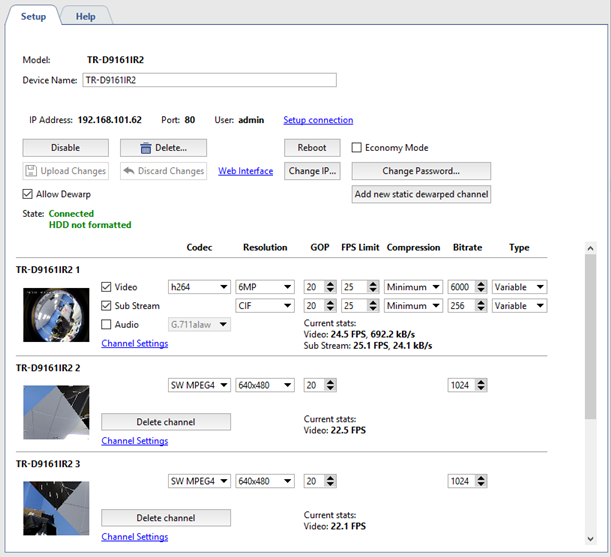
To create a new virtual channel press Add new static dewarped channel button.
Important
The number of devices for which virtual channels can be created is determined by the software license. The server allows creating 4 virtual channels maximum on each device.
New channel will appear under the main one. You can activate Sound if it is activated on the major channel and set the following parameters:
- Codec is compression codec used. mpeg4 codec is used to compress virtual channel.
- Resolution is size of image.
- GOP (Group of pictures) group of pictures containing one key picture.
- Bitrate - video compression level.
Tip
Please note that at local view of the virtual channel non-compressed stream is displayed, an the compressed stream is recorded to archive.
You will also see compressed stream while virtual channel viewing from the client.
The Current stats field displays video FPS and the speed of the channel record to the archive.
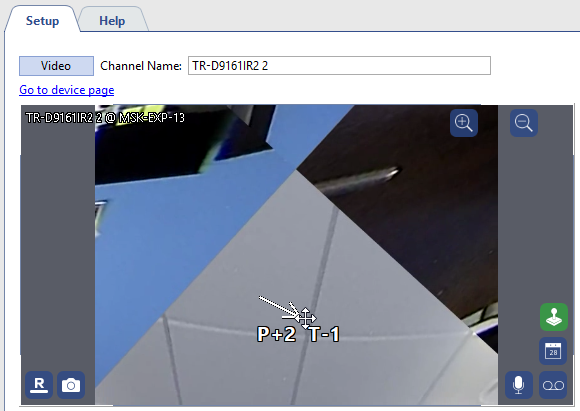
Go to Channel settings to specify image area to be isolated in to the virtual channel and saved into archive. To do this use PTZ-functions of the image control:
Tip
Other channel settings feature are also applicable to set up a virtual channel.
