
To start using SipPhone plugin, the below described settings should be configured. After that, the operator will be able to call Asterisk subscribers, receive calls and send service instructions.
Important
Prerequisites for using the functionality:
-
To activate the SIP telephony plugin, you must have the LICENSE_SIP_CLIENT license on the server.
Available licenses are listed in the server settings on the tab License.
- An account for each server should be created on the Asterisk server, which will be used by the operator to receive and make calls.
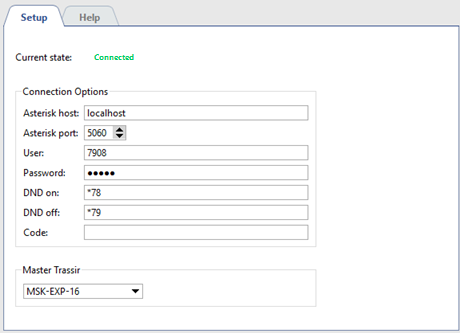
Set up Connection parameters:
- Asterisk server - Asterisk server IP-address or DNS-name.
- Asterisk port - Asterisk server network port (by default:
5060). - User and Password - account name (phone number) and password on Asterisk server.
- Activate DND and Deactivate DND are commands sent to server to activate and deactivate DND ("Do Not Disturb") mode
- Key - a command to open the door sent to home entry system device from operator's interface.
The status of connection to dial office IP is displayed in the Status field. In case all parameters are specified correctly, Connected line will appear. Otherwise you'll see error message.
In case you would like the current server operator to have access to the calls' history, phone talk records and set associations of channels, select in Master TRASSIR field name of server on which connection to AMI server is set.
Tip
Selecting a server as Master TRASSIR will be possible only after the connection to it. See detailed description of connection to server procedure in the section Connecting to a new server.
