
The "Face recognizer" basic settings vary depending on plugin version. You can find the settings on the Plugins -> Face Recognizer tab.
-
Face recognizer
-
Face recognizer 2.0
Tip
Some plugin settings can be changed individually for each channel, if necessary (see Face recognizer settings for the channel and Face recognizer 2.0 settings for the channel).
General settings
The plugin can process images from all cameras connected to it simultaneously. The maximum number of simultaneously activated detectors is determined by the license and displayed in the Available licenses block in the detectors field.
The plugin uses two databases in operation:
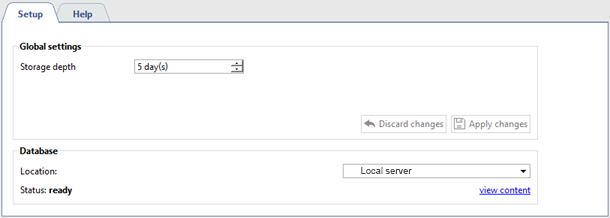
- Temporary Face Database for keeping all recognized faces. Its size is defined in the Storage depth setting. It is used by Face Recognizer 2.0
- Face database containing information about the person and his anthropometric data, which is used for comparison with the person found on the video. The maximum size of this database is determined by the license and displayed in the Faces DB size field.
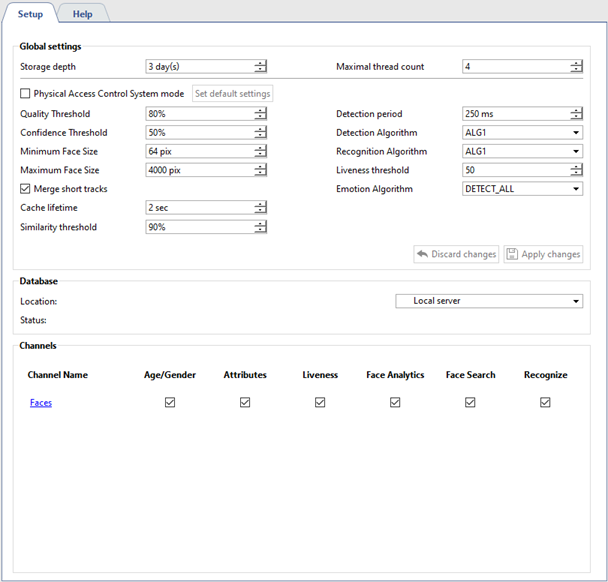
Maximal thread count is the number of "queues" in which faces are detected. In each frame received, it tries to detect a face and, by increasing the number of streams, you increase the detection rate. The maximum value of streams is limited by the number of processor cores on the server.
Important
Be careful, increasing the number of streams will increase the server load.
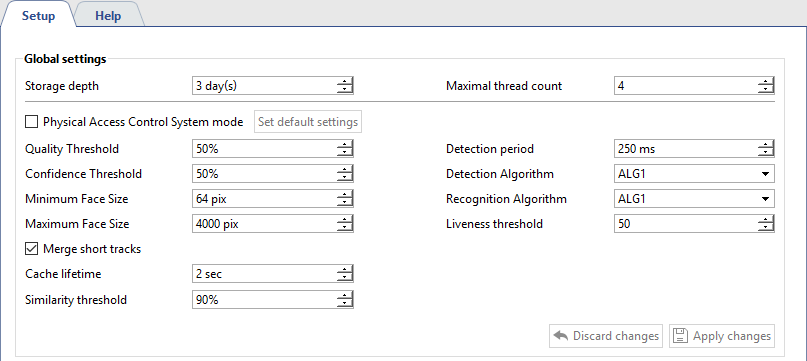
The plugin can search for faces on all frames. However, not all frames show human faces in a good quality. In order to prevent false detections, change the following settings:
-
The Physical Access Control System mode flag enables the detector's Physical Access Control System mode. Press the Set default settings to enable detector's settings optimized for Physical Access Control System operation.
-
Quality threshold excludes poor quality faces: greased, partially hidden, etc.
-
Confidence Threshold is the boundary that determines the degree of compliance of the detected person and a person in the faces database.

-
Minimum face size and Maximum face size determine the range of sizes of the faces the plugin works with.
-
Detection period is an interval between the frames that will be used to detect faces, the smaller it is, the more often faces will be searched on the video.
-
Detection algorithm is an internal set of rules, with the help of which a face is detected on video.
-
Recognition algorithm is another set of rules, with the help of which faces are recognized among the detected ones. The algorithm is selected depending on the required detection quality and the resources of the server which will analyze video:
ALG1 - average recognition quality with the moderate resource usage;
ALG2 - high recognition quality with average resource use;
ALG3 - the highest recognition quality with the use of large amount of resources.
-
Liveness threshold - is a level of alikeness of the detected face to a human or a photo.

-
Emotion Algorithm - is a set of rules allowing to show only happy looks from all detected faces.
Moving person can turn his head or face and can hide behind natural obstacles. Set Merge short tracks flag and the plugin will combine these movements into one, depending on the following parameters:
-
Cache lifetime is the time during which the plugin stores the face of one person, found in different frames. For example, a track lifetime is 5 seconds, the plugin detected the face and the person turned away from the camera. If he turns back 4 seconds, then the face information will be added to the existing record. And if in 6 seconds, then a new one will be created.
-
Similarity threshold is the boundary that determines the degree of similarity of detected and stored earlier face of a person. If the face looks alike, the information about it will added to the current database record. If not, then a new one will be created.
-
Detect More - in Face Recognizer settings, set the Determine gender and Determine age flags, in order to display this information in the operator's interface when a person is recognized.
Face database

Face database can be stored both locally and on any server with the appropriate license. In order to connect to the database, configure the connection to the server and specify it in the Show face DB configuration. To use a local database, select the name of the custom server. And to go to the face database click the appropriate link.
Important
The face database local cash is used for face recognition. That's why in case of the face database server connection loss, the face detection continues. The local face database cash will be updated upon the connection recovery.
Channel management

At the bottom of the window, a list of cameras with enabled Face tracker/recognizer plugin is displayed. Clicking on the link will take you to the plugin settings on the selected camera. By setting the appropriate flag in front of the camera, you will enable:
-
Age/Gender - displays a person's gender and age in operator interface.
-
Attributes is face search by specific human appearance attributes.
-
Liveness is a feature distinguishing a person from photo or image on video.
-
Analytics - sends data on the recognized face to the "Analytics" script.
-
Face Search - search by face and photo functions.
-
Recognize is a face detection feature with the help of face database
Tip
For a detailed description of the operator interface, see Face recognizer section of Operator manual.
