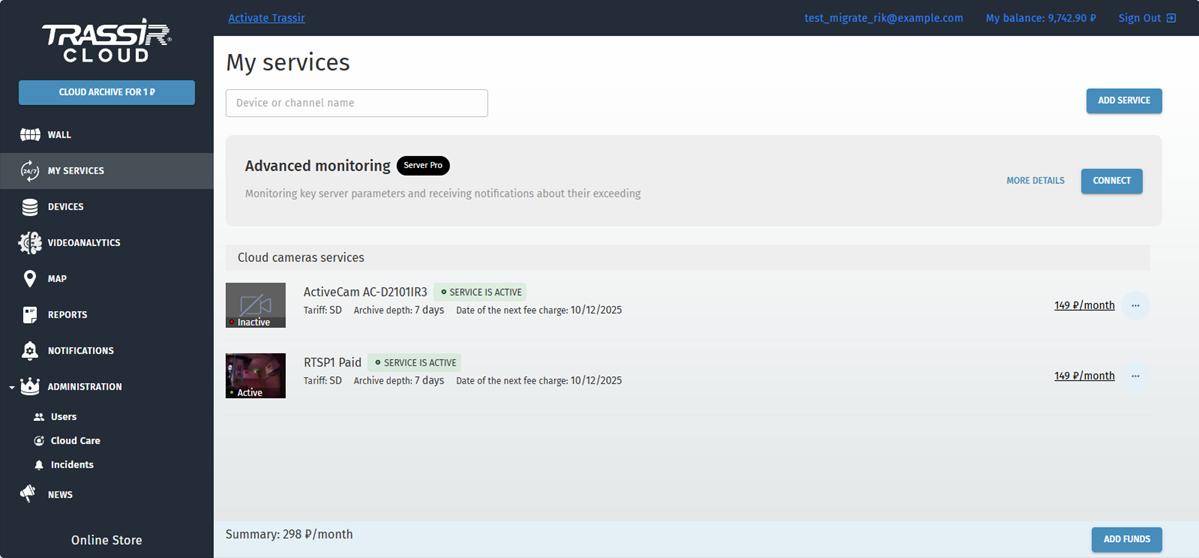
TRASSIR Cloud services let you enable archive recording in the cloud. You can manage connected services and add new ones in
the My services menu.
Warning
The archive recording from IP cameras is a paid service.
The archive preview from the cameras, connected to the servers, is free of charge.
Adding a new service
You can add service for any camera, video recorder or server, connected to TRASSIR Cloud.
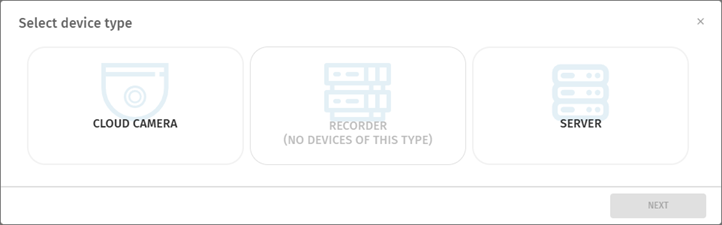
Select My Services in the main menu and click Add service. After that, select device and channel from which the video will be recorded to the cloud archive. Press Next.
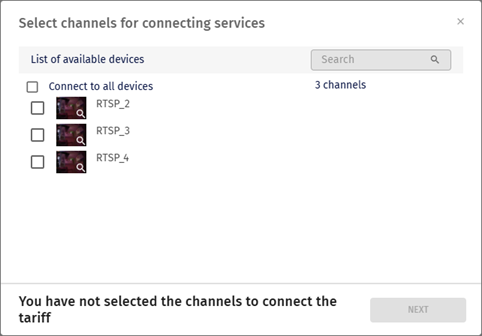
Check channels to enable the service. Press Next.
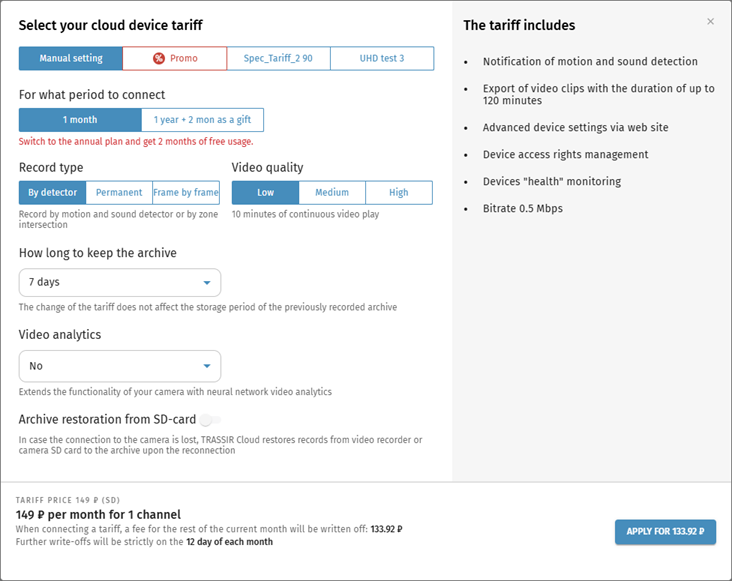
Select a Tariff, how long to keep the archive and the video analytics type if needed. Click Apply.
Important
The following information should be considered when choosing a tariff:
-
Time of continuous video playback depends on the video quality:
Low: up to 10 minutes
Medium: up to 30 minutes
High: up to 60 minutes
- The duration of the exported video fragment for all quality levels is no longer than 120 minutes. Read more about the video
export in Archive export in TRASSIR Cloud.
It is recommended to use Archive restoration from SD-card feature with the devices on which archive recording to internal storage is set up.
When enabled, the cloud archive is synchronized with the archive on the device SD card.
If the connection with the camera is lost, when it is restored, TRASSIR Cloud will download to the archive what the camera
recorded on its SD card or recorder.
The maximum archive depth which can be downloaded from the device is 72 hours. If the connection with the device has been
lost for more than 3 days, the cloud will synchronize only the last 72 hours of the archive after the connection recovery.
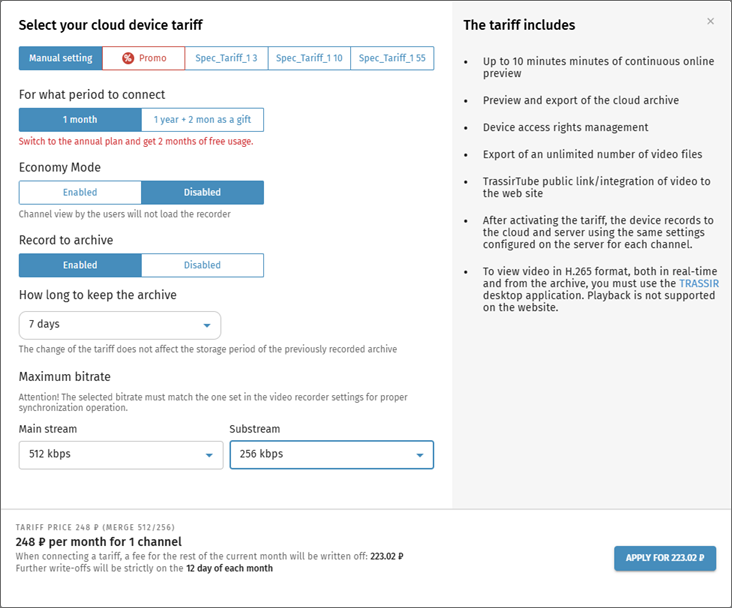
When you add a service for your server, alongside with the synchronization depth and tariff, you need to select the Maximum bitrate for the synchronized streams. To do this, select the archive stream to record to the cloud (main stream or sub stream) and
set the bitrate. You can choose one or both streams simultaneously.
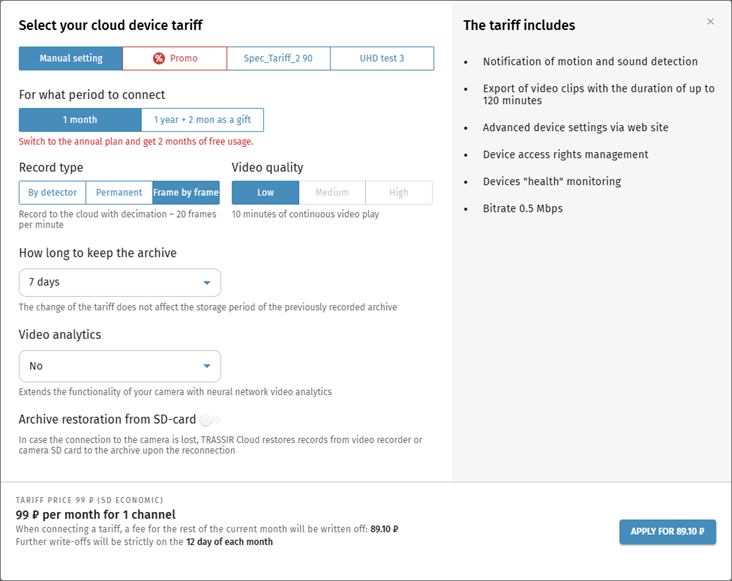
Frame by frame recording to the Cloud with 20 frames per minute decimation is available for cloud cameras. This function is useful for channels
that do not record constant movement and do not require real-time archive recording.
Tip
Specific aspects of Frame by frame recording:
- Only low quality video is available.
- Archive recording from SD card is unavailable.
Press Next. The archive recording to the cloud will start instantly, and you will be charged a monthly fee according to the selected
tariff. Read more about fees and balance in My Balance section.
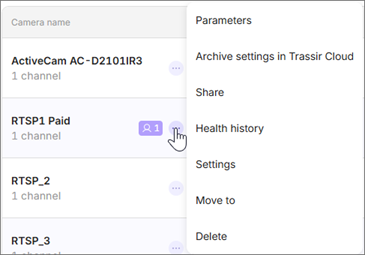
The Archive recording to TRASSIR Cloud service can be enabled and configured not only in the My Services menu, but also wherever the channel video is displayed. To do this, open the channel settings context menu and select Add archive recording to the Cloud or Archive settings in TRASSIR Cloud.
In the opened window select the tariff parameters and connect the service.
Rules of monthly fee charge and service delivery
-
First connection:
The date of the first connection is taken as the billing period date. All further connected tariff plans are bound to this
billing period date.
-
Enabling a service:
The subscription fee for the tariff plan is charged in full upon the tariff plan activation, then a month after the previous
charge, if there is a sufficient amount of funds on your balance. The service is considered provided from the moment of providing
access to the service in accordance with the selected tariff.
-
Changing a service:
When changing the tariff plan, the subscription fee is charged immediately for the period from the date of the change to the
billing period date (the cost is calculated proportionately to the remaining days until the end of the current billing period);
the tariff is connected immediately, while the date of the billing period does not change; there is no refund for unused days
when changing the tariff plan.
-
Removing a service:
There is no refund when removing a tariff since the service is considered as rendered.
-
Connecting several tariff plans:
The new tariff subscription fee is charged at the moment of connection (the cost is calculated proportionately to the remaining
days of the current billing period). Stating from the next billing period it sums up with the previous tariff plan subscription
fee and is charged at the previously assigned billing day. If the billing date falls on a non-existent day of the month (29/30/31),
then the fee is charged on the last calendar day of the month.
-
Removing a camera:
When you delete the camera on which the tariff plan was connected, the service is considered to be provided and the money
is not returned to the account.
-
Auto extension:
When you connect a tariff plan, automatic renewal of the service is enabled.
-
Withholding a service / insufficient balance:
In case the balance is not sufficient for extension of all connected tariffs at the moment of the monthly subscription fee
charge, then the free base tariff functionality will be available for the user until the balance replenishing and the fee
charging.
Upon receipt of funds to the personal account in the required amount, the services will be resumed, while the date of the
billing period will be changed to the date of receipt of funds. If there is not enough money to pay for all connected tariffs,
the services are not resumed.
-
Services connected before the 27th of July 2020 :
The monthly subscription fee is divided into the number of days of the billing period and is charged daily. The rest of funds
on the personal account is calculated daily, with the onset of a new day (00 hours 00 minutes according to the time set on
the server).
In case of the change and/or cancellation and reconnection of a service (including the change or cancellation of the tariff
plan), further calculations are carried out according to the rules indicated above.
-
First connection:
The billing date for legal entities is the 1 day of a calendar month. The first writing off will be on the day the service
is activated, in the amount proportionate to the number of days remaining until the 1st day of the next calendar month. The
service is considered provided from the moment of providing access to the service in accordance with the selected tariff.
-
Changing a service:
When changing the tariff plan, the subscription fee is charged immediately for the period from the date of the change to the
billing period date (the cost is calculated proportionately to the remaining days until the end of the current billing period);
the tariff is connected immediately, while the date of the billing period does not change; there is no refund for unused days
when changing the tariff plan.
-
Connecting several tariff plans:
The subscription fee for the corresponding service is charged at the moment of its activation (the cost is calculated proportionately
to the days remaining until the end of the current billing period), and starting from the next billing period it is added
to the subscription fee for the first connected tariff plan and charged on the 1st day of the next calendar month.
-
Removing a service:
There is no refund when removing a tariff since the service is considered as rendered.
-
Removing a camera:
When you delete the camera on which the tariff plan was connected, the service is considered to be provided and the money
is not returned to the account.
-
Auto extension:
When you connect a tariff plan, automatic renewal of the service is enabled.
-
Withholding a service / insufficient balance:
In case the balance is not sufficient for extension of all connected tariffs at the moment of the monthly subscription fee
charge, then the free base tariff functionality will be available for the user until the balance replenishing and the fee
charging.
Upon receipt of funds to the personal account in the required amount, the services will be resumed, while the date of the
billing period will not change. If the date of the suspended services renewal does not coincide with the first day of the
month, then the monthly fee for this month is charged proportionately to the remaining days of the month.
If there is not enough money to pay for all connected tariffs, the services are not extended.
-
Services connected before the 27th of July 2020 :
The monthly subscription fee is divided into the number of days of the billing period and is charged daily. The rest of funds
on the personal account is calculated daily, with the onset of a new day (00 hours 00 minutes according to the time set on
the server).
In case of the change and/or cancellation and reconnection of a service (including the change or cancellation of the tariff
plan), further calculations are carried out according to the rules indicated above.