
Exculpatory document is the information that supplements the Access Control with certain data on persons' working time, which will be used in the formation of reports. The following documents can be used as exculpatory: holiday request, sick list, business trip, etc. Without a corresponding explanatory document, the Access Control will mark an employee's absence from the workplace as unauthorized.
This section allows you to create and edit documents confirming an employee's absence from work. Go to Plugins -> Access Control -> Exculpatory Documents.
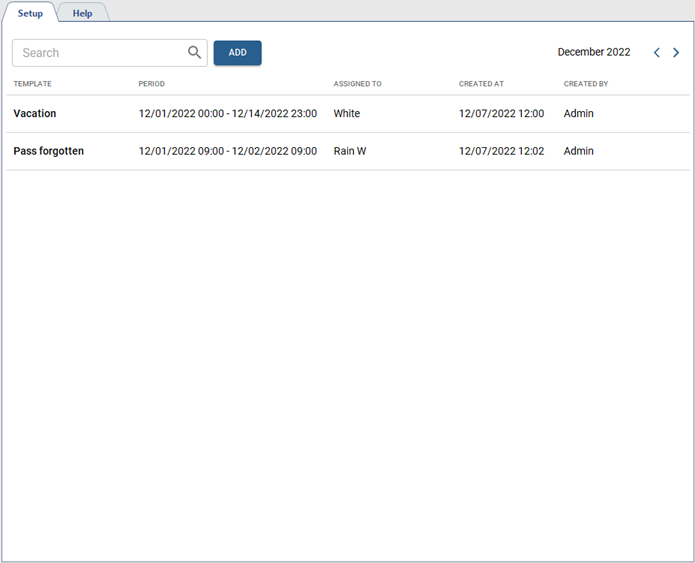
Press Add to create a new person in Access Control.
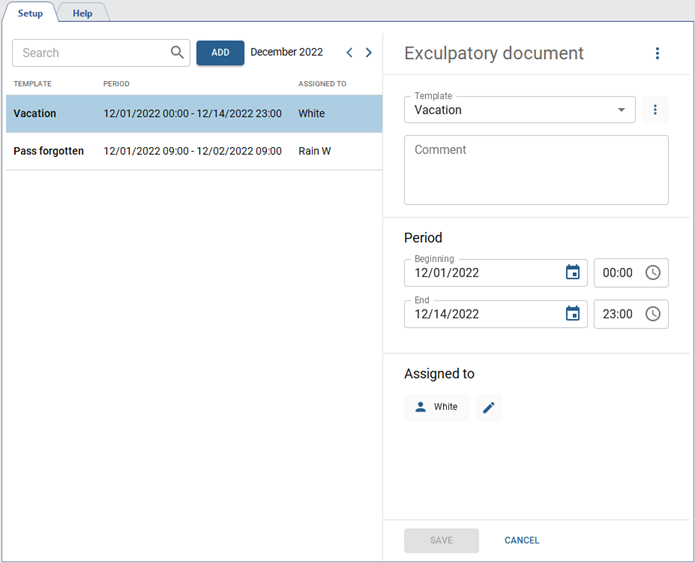
Follow the next steps:
-
Select the explanatory document template.
If there is no suitable template, then create one. To do this, click
 near the Template field and select Add.
Table 118.
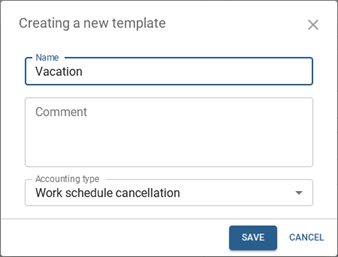
In the opened window, enter the Name, Comment and select one of the Accounting types:
-
Strictly as in exculpatory document - the entire period of time specified in the exculpatory document is counted as working time, regardless of the actual presence of the person at the workplace.
-
Overlap with work schedule - only the period of time specified in the explanatory document and coincides with the planned work schedule of the person, is considered as the working time.
-
Work schedule cancellation - the person's work schedule is cancelled for the entire period of time, specified in the explanatory document.
-
Do not take - this type of accounting does not count in any way in the calculation of working time. It can be used when it is necessary to leave some additional information in the commentary to the explanatory document.
-
-
You can add a comment to the explanatory document, if necessary.
-
Specify the period of time, within which the document will be valid.
-
Add a person to whom this exculpatory document will be assigned.
