
The administrator can configure all parameters of the server operation in the Settings window.
All server settings are represented as an object tree. However, other servers can also be objects of the settings tree - just set up a network connection to them, and you can configure them remotely.
Warning
A remote server configuration is possible only in case the account being used for connection has the necessary rights. Remember that each server has its own list of users. Therefore, when remotely connecting to a server, use an account that was created on the remote server.
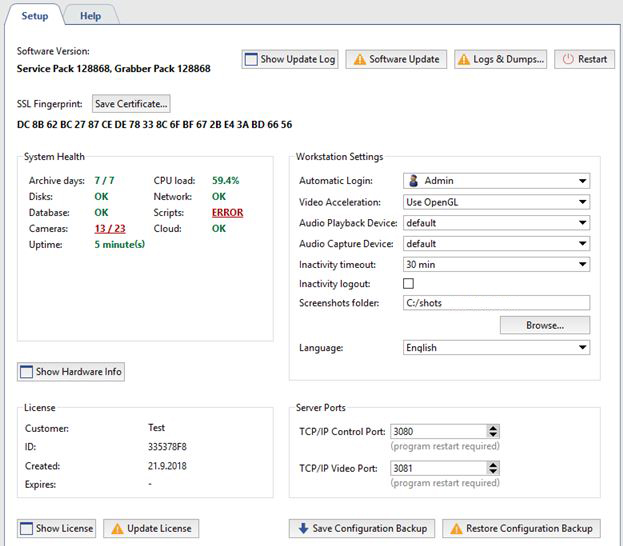
The local server is always located at the top of the list of servers. By default, the main server settings tab is displayed when the settings window is opened.
Table 3.
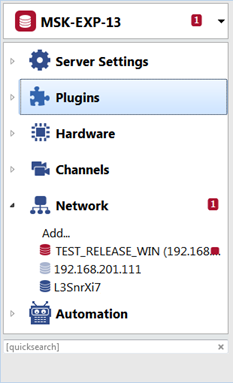 |
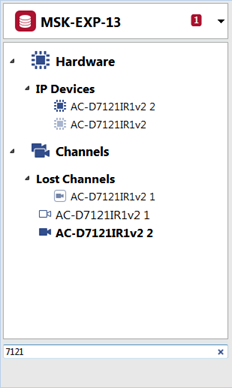
In case certain menu entries have errors in the settings, they will be automatically highlighted. Total number of error messages is displayed in settings tree nodes. A server can have a substantial number of objects parameters of which can be set (especially in case connections to the other servers are set from the given server). Use fast context search field to proceed quickly to the requested objects. |
 |
You can check the description of all server settings in the following sections: Settings and Plugins
