
The settings made during server installation and during first launch are already sufficient for its operation.
To expand the basic capabilities, make additional server settings.
Click the Settings button. The main server settings window will be displayed, with a tree of subsections on the left. Clicking through these subsections will open the corresponding settings in the Setup tab. For more information, go to the Help tab, which is specific to each subsection.
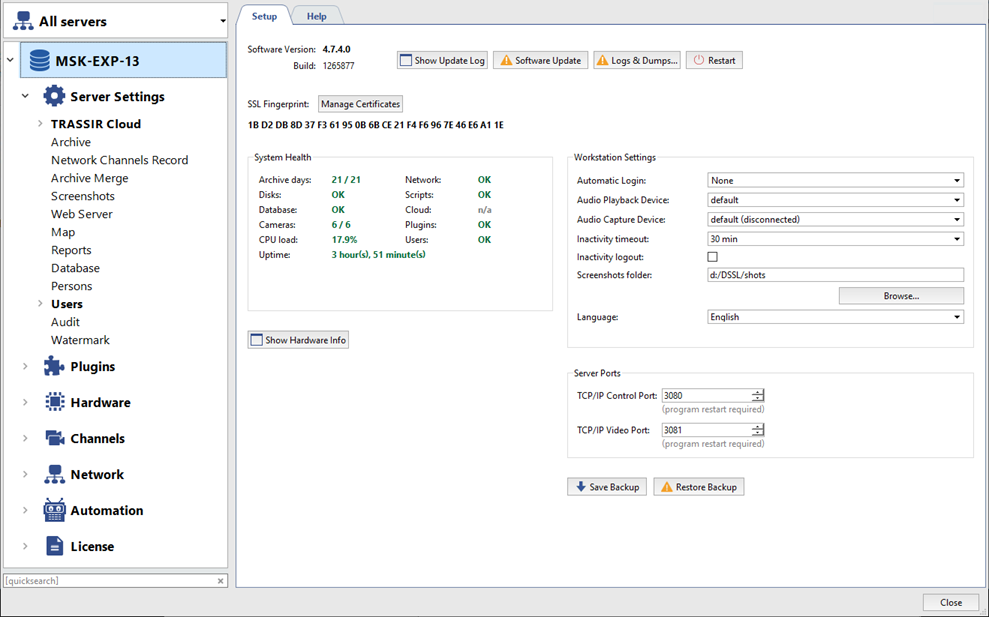
To quickly find settings, enter a query in the quicksearch field below the subsection tree.
The subsection tree contains, among other things, the following important settings:
- TRASSIR Cloud: connect to TRASSIR Cloud
- Archive: configure archive settings
- Database: connect your server to a database to save all server events
- Users: create users and configure their rights
- IP Devices and Channels: connect IP devices to your server and configure their channel settings
- Network: connect to other servers
- Automation: create rules and scripts to automate your server operation.
Moreover, with additional plugins you can significantly expand the basic server functionality.
