
Area Control detector automatically detects the appearance or disappearance of objects within a specified virtual zone in the field of view of the video camera. It is used to protect territories, control access and increase the level of security.
To enable and configure the Area control detector, you need to check Hardware Analytics in Channel Settings, click the button and select Area control.
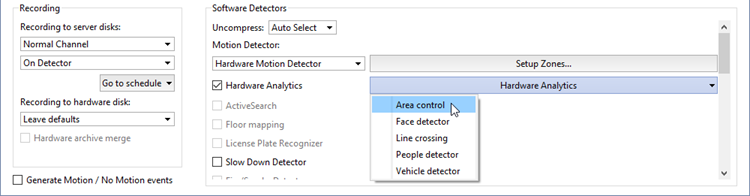
Detector settings window:
-
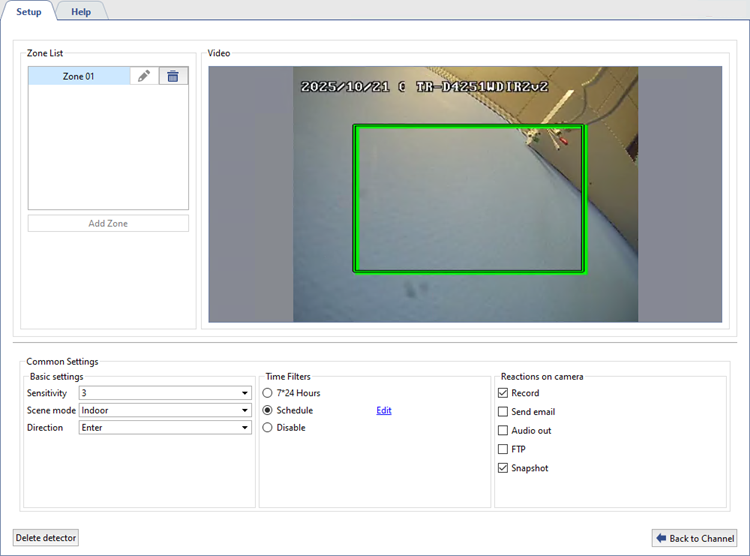
In the Zone List select a zone and place it on the camera video. To do this, click on the corner of the zone and move it. Do the same with the other corners.
-
Define the Common Settings of the detector:
- The Sensitivity parameter determines the sensitivity of the detector. The higher the value, the higher the probability of detecting an event of entering or leaving the zone. If false alarms occur, the sensitivity value should be reduced.
- Select the Scene mode: Indoor or Outdoor to optimize the detector's performance depending on the recording conditions.
- The Direction parameter determines the type of object movement relative to the specified area, which should trigger the detector: Enter, Leave or Bidirectional.
-
In the Time Filters setting, select the detector operating mode:
7*24 h.: if it is necessary for the detector to work continuously around the clock, 7 days a week.
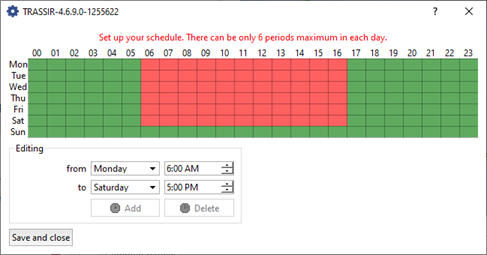
Schedule: to set up specific intervals for the detector to operate. To do this, click on the Edit link and in the window that opens, highlight in red the time intervals during which the detector should be active.
Disable: to turn off the detector.
-
In the Reactions on camera setting, select the actions that will be performed when the detector is triggered:
- Record: automatic start of video recording from the camera when the detector is triggered. The footage is saved to the local storage of the camera or to the NFS server.
- Send email: automatically send a notification with an attached photo or other information about the event to an email address.
- Audio out: playback of the camera's audio signal through a connected device.
- FTP: send files (for example, photos or video clips) to the specified FTP server for storage or subsequent processing.
- Snapshot: create a snapshot of an image at the moment of an event and save it to the camera's local storage or to an NFS server.
- Alarm output: activate a connected external device (for example, a siren) via the camera's alarm output.
- Strobe light: activate the built-in strobe light to visually alert or deter intruders.
Tip
The list of available reactions depends on the camera model.
To perform the selected actions, all necessary parameters must be correctly configured in the camera settings. For details, see the camera user manual.
