
This section lets you configure card security profiles to provide an additional level of security when issuing employee identification cards. In addition, you can protect cards that have already been issued, keeping them private and secure while in use.
To create a new profile, open Plugins -> Access Control -> Card protection.
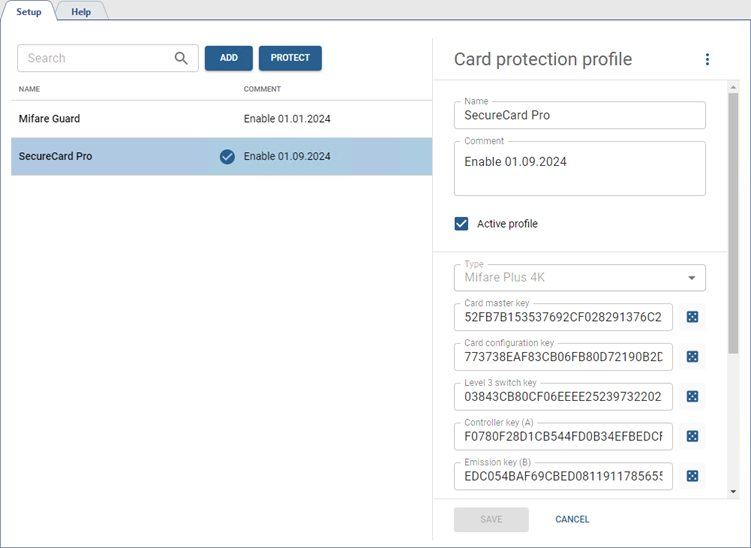
Press Add, enter the profile name, add comment and configure the protection parameters.
-
Select Type: Mifare Classic 1K, Mifare Plus 1K or Mifare Plus 4K.
Tip
When selecting Mifare Plus 1K or Mifare Plus 4K types, it should be taken into account that this profile will work only with the TRASSIR TR-R1D.
-
Enter the protection parameters, corresponding to the selected type. To generate a random security key, click
 .
.
Tip
When selecting a value in the UID size in bytes, you should into account the data format selected in the device's settings:
- 3 bytes for Wiegand 26;
- 4 bytes for Wiegand 34;
- 7 bytes for Wiegand 58.
-
To enhance the security of card data, you can set the Reverse byte order flag and select the UID type that will be written to the protected memory block of the card.
Important
If Manual input is selected, the Use card protection function will be unavailable when creating or editing a person (see section Creating a new person).
Also, the value in the UID size in bytes field must be considered. An error will occur in the following cases:
- the number entered when creating the secured card exceeds the UID size in bytes;
- the data size on the card is less than 7 bytes, if Card number and 7 are selected in the UID type and UID size in bytes settings.
-
Set the Active profile flag, to activate the current security settings for the operation with the cards and ensure their safe use in the access system.
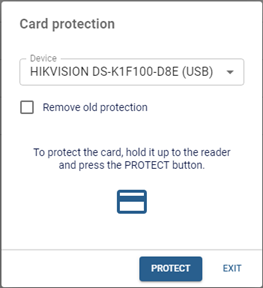
Press Protect to protect already issued cards with an active profile.
Table 120.
 |
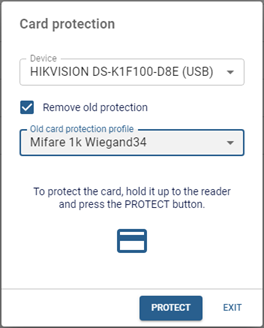 |
In the window that opens, select the Device to which the cards will be applied. Then apply the card to the reader and click Protect. Repeat the protection procedure for the remaining cards. If you need to disable the previous protection level and enable the new one, set the Remove old protection flag and select Old card protection profile. |
