
An incident is an event or an event sequence captured by the surveillance system and requiring attention and possible response from the operator of the system.
Important
The incidents are displayed in the operator interface only upon connection to the TRASSIR Cloud and Cloud user login. Both servers and Cloud cameras, as well as the Cloud, can be the source of incidents.
See detailed connection of servers and cameras to the Cloud in the TRASSIR Cloud manual (see Devices).
To enter the Alarms Mode and work with the incidents, click  in the upper button menu.
Cloud devices connected to the TRASSIR Cloud support several types of alarms: motion or sound detection, the device health alteration, and others.
Apart from that, the incidents occur in response to the activation of various detectors (Motion, Loss of Signal, Camera Sabotage) and are displayed as alarms in the operator interface. Each incident contains the event information sufficient for its analysis.
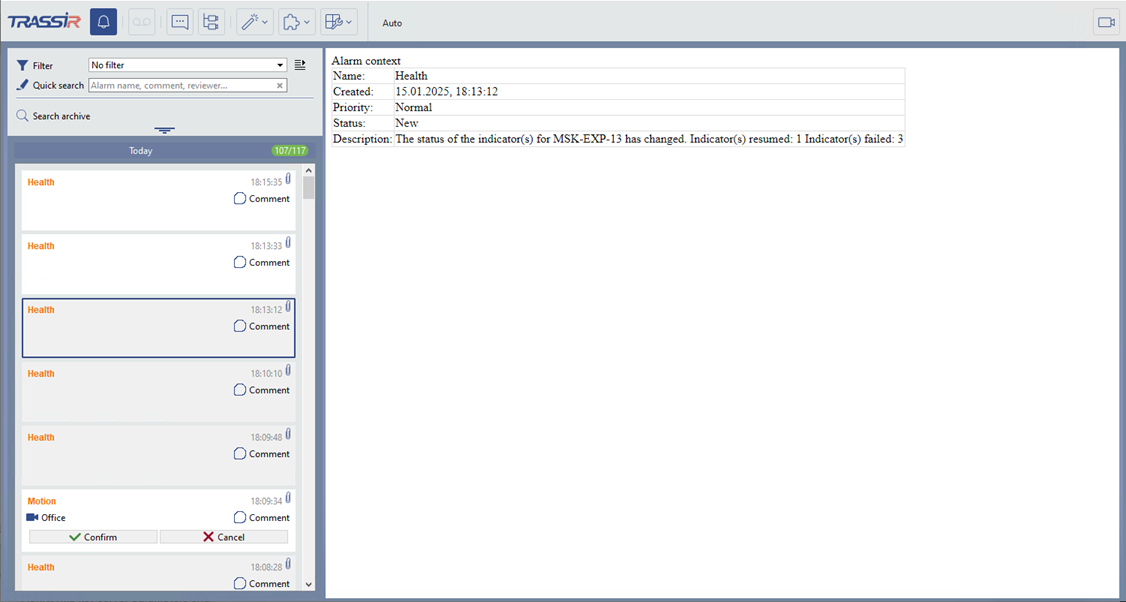
The incident contains the following:
-
General information: the alarm name and time of creation.
-
Alarm context: static and dynamic information for the event analysis:
-
Static information: images, text description or links to the archive. Displayed immediately after the incident is received without any user actions.
-
Dynamic information: video recordings, preview from the Cloud or links to the archive events. Requires connection to the server or Cloud for display.
-
-
Incidents can include their processing status and user comments and notes on the actions performed.
-
Depending on the incident type, additional information can also be included, such as detector parameters, analytics results, links to external resources or details on linked events.
The alarm context and additional information depend on the incident source and type, as well as on the system settings and processing scenarios.
