
Audit is a module that allows you to monitor all user actions performed in TRASSIR. For example, manual change the archive recording mode, changing the IP-device settings, reviewing the archive by the operator, etc.
In the Settings window on the Server settings -> Audit tab, you can view the log.
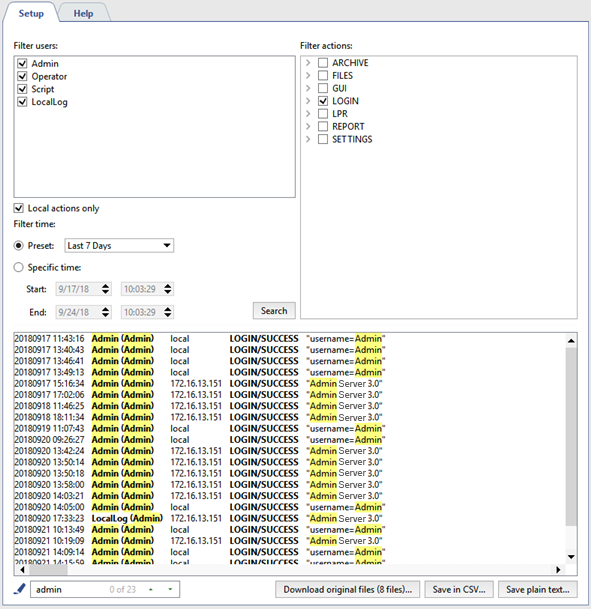
In the top part of the Audit tab there is a set of filters you can use to display only desired events in the log.
You can use the following filters when viewing the log:
- In the Filter users field, select one or more users whose actions should be displayed in the log.
Tip
All actions that take place in TRASSIR, but are not caused by direct user actions, are stored in the log under the LocalLog user.
- In the Filter actions, select the actions that should be displayed in the log.
- In the Filter time settings group, select the time period for which you want to view the log.
When the Search button is clicked, user actions that match the selected filters, along with the date and time when they were performed, will show in the bottom part of the tab.
Tip
You can use highlighting to quickly search for a specific user action.
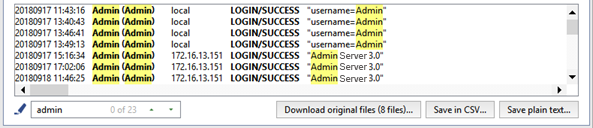
Table 7.
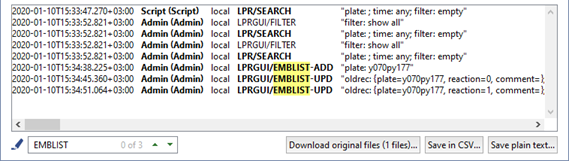 |
If you need to find users who made changes in the AutoTRASSIR embedded list, select LPR in the Filter actions and start searching. The changes made in the lists are displayed through the following actions:
|
You can save the resulting action log to a file, if needed. To do this, click the Save in CSV... button or Save plain text....
During the operation, the software saves all user actions to the *.log, which is located in the audit of the software installation directory. A log file is created every day upon the first launch. At the same time, the older
(yesterday's) file is archived and saved in the same folder and, if needed, can be downloaded and viewed. Click the Download original files... button to download the file.
