
There is My balance link at the upper right of the TRASSIR Cloud window, by which the current account state is represented. Click the link to go to the balance management page.
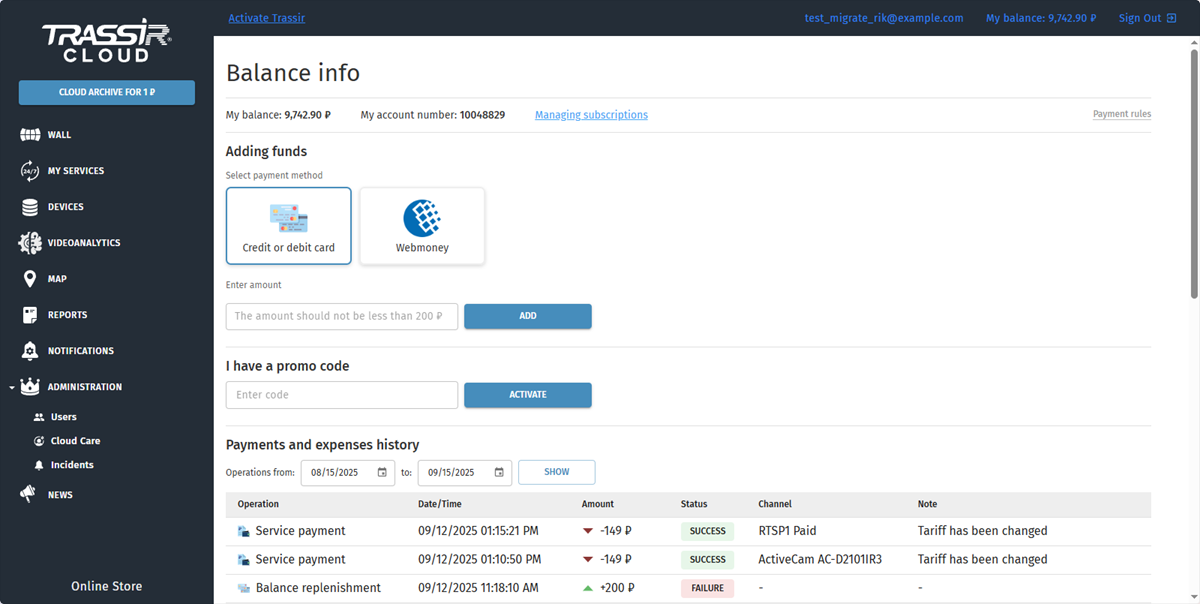
Here you can:
- refill the balance and link the card to the account;
- activate promo code;
- check the history of payments and expenses.
Important
The subscription fee is written off from the account upon activation of the service and, in the future, for its renewal. The subscription fee is charged at 2:00 Moscow time. Read more in Rules of monthly fee charge and service delivery.
Adding funds
-
For individuals:
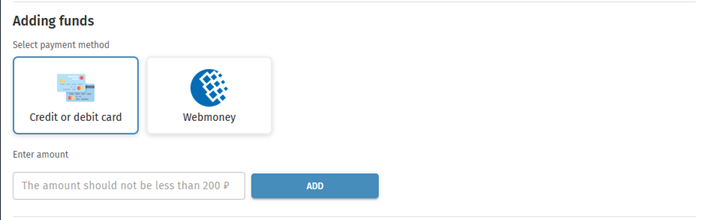
Select the payment method (Webmoney or bank card). Select the payment amount or specify manually.
Click Add and a Paymaster window will open. Enter your payment data and complete the payment. The money will be added to your account balance after a while.
-
For legal entities:

Check the correctness of your company details.
Select one of the payment methods:
-
Bank card.
Select the payment amount or specify manually.
Click Add and a Paymaster window will open. Enter your payment data and complete the payment. The money will be added to your account balance after a while.
-
Invoice payment.
Enter the payment amount and press Request invoice.
Tip
The invoice will be sent to the email address provided during registration, within 24 hours, on weekdays.
After the payment, the money will be received to the account within 48 hours, on weekdays.
-
Activation of a promo code
On My balance page in the I have a promo code area enter the code symbols into the corresponding field and press Activate.
After that, the amount, corresponding to the code, will be charged to your account. Use it for service payment.

