
This section allows you to set up TRASSIR ACS Enterprise connection to the servers where the local versions of TRASSIR ACS are running.
Important
The number of connected servers is determined by the number of LICENSE_PACS_ENTERPRISE licenses on the server.
Available licenses are listed in the server settings on the tab License.
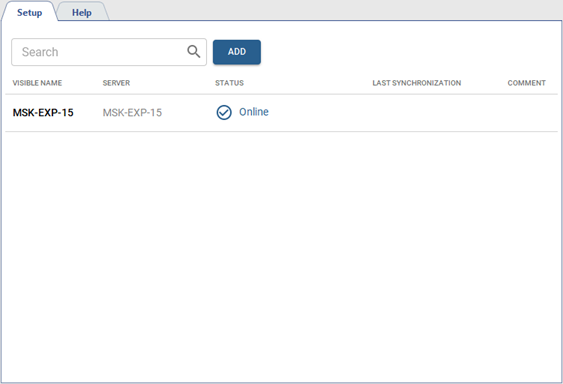
Go to Plugins -> Access Control Enterprise -> Servers.
Tip
The server with the local version of TRASSIR ACS must be connected to the server with TRASSIR ACS Enterprise before adding.
Read more about server connection in Connecting to a new server.
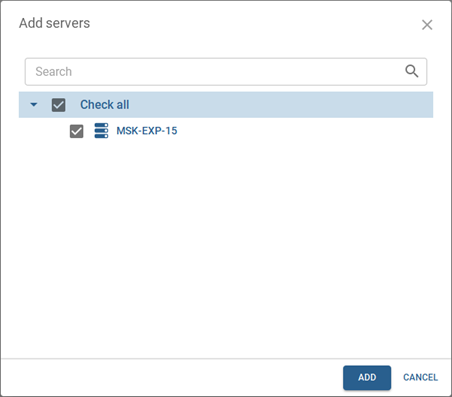
To add new servers, press Add and select the required servers from the list:
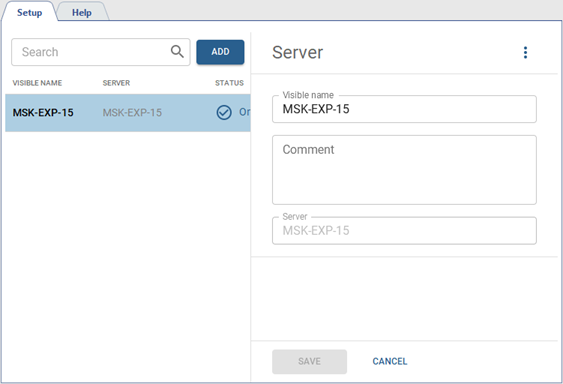
Click on the added server to change its name or add a comment.
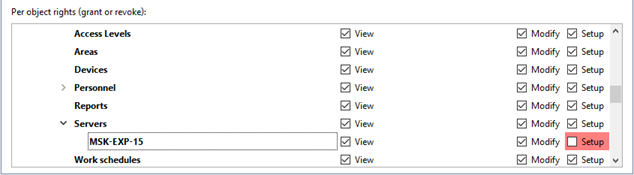
You can use the rights to the individual server objects to set different options to access viewing and editing functions of servers running local versions of TRASSIR ACS.
The rights are located on the rights tree at: Server name -> Plugins -> Access Control enterprise -> Servers.
-
If the server has the View right enabled, the areas and access levels configured on it will be displayed on the Servers, Access Levels, Areas and the Personnel tabs.
The servers that have the View right disabled will not be displayed on the tabs. However, if, for example, an access level or zone from this server is selected, it will be displayed along with the selected item, but the full list of items will not be available for viewing.
-
The server with View and Modify rights enabled will appear on the Servers, Access Levels, Areas and Personnel tabs, but their parameter editing will not be available.
-
The server with the Setup right enabled is available for editing and assigning access levels and areas configured on it to the persons.
